# Introduction
**`@intelligems/headless`** is Intelligems' official NPM package for integrating price testing, A/B testing, and personalization into **headless storefronts**.
{% hint style="info" %}
Make sure to have an active subscription to [Intelligems](https://www.intelligems.io) before continuing.
{% endhint %}
**How it works**
The provider loads your experiment config server-side, assigns users to groups, and then exposes pricing/content data via React context. Components can read that context to render the right price or content variant for each visitor — without any flicker, because the config is available before render.
# Change Log
## 1.2.19
* **Fix:** `graphql-tag` was not properly outputted for .cjs builds
* **Fix:** removed the `@intelligems/ts-retry` git dependency, which could break installs that have no GitHub access
## 1.2.18
* **Fix:** useIgCart was not updating cart metafields
## 1.2.17
* **Fix:** Preview widget could fail to display its UI correctly
* **Fix:** Preview widget could fail to appear on first page load until the user scrolled or otherwise triggered a re-render
## 1.2.16
* **New:** `intelligemsVitePlugin()` exported from the hydrogen-only entry point for Vite compatibility
* **New:** Redirects API — `useIgVariation` and `useIgVariations` now include a `redirects` field; new `HeadlessVariationWithRedirects` and `HeadlessRedirect` types exported
* **New:** `productId` and `plpCollectionId` are now included in page view tracking payloads
* **New:** Product targeting is now supported in experience evaluation
## 1.2.15-beta
* **Fix:** Stores using the Intelligems loader to provide configuration would show a flash of default content before the test group rendered
## 1.2.14
* **New**: Intelligems will automatically infer the active currency for targeting purposes based on the currency defined on the cart
* **Fix:** GA and integration tracking events could fire more than once per session
## 1.2.13
* **New:** `useLocation` hook added (Hydrogen only)
* **New:** `window.igVersion` is now set by the provider
* **Fix:** `useIgGCart` was making redundant requests to get and update cart attributes on each render
## 1.2.12
* **Fix:** Users in deferred audiences could be incorrectly excluded from assignment
## 1.2.11
* **New:** `useIgPrices` now returns `experienceId` and `variationId` alongside price data
## 1.2.10
* **Fix:** First-visit detection could behave incorrectly in some rendering environments
## 1.2.9
Update Shopify GraphQL version.
## 1.1.0
* Personalization and Gift with Purchase support
* Shipping test support
* Several new hooks:
* `useIgOffer`
* `useIgOfferTier`
* `useIgOffers`
* Bugfix - fetch cart/checkout before updating attributes in order to persist existing attributes.
## 1.0.0 - Major Release
### Breaking Changes
1. `useIgExperiments` is no longer avaible. It is now `useIgExperiences`.
2. `useIgTestGroups` is no longer available. It is now `useIgVariations`.
3. `useIgTestGroup` is now longer available. It is now `useIgVariation`.
4. `useIgCheckout` is no longer available. It has been combined with `useIgCart.`
### New Features
* Preview mode now more closely aligns with our non-headless preview mode.
* Previews are now loaded individually.
* `useIgStyles` - Exports colors to show price changes in integration mode.
* `useIgPreviewedExperience` - Returns the experience actively being previewed.
* `useIgConfigExperiences` - Returns all experiences in the current configuration file.
* Exclusion Groups are now supported.
* Custom Events are now supported.
## 0.4.0
* Feature - Update package to use the latest Traffic Config and Page Targeting features.
## 0.3.3
* Bugfix - Unassigned users incorrectly marked as excluded in track event.
## 0.3.2
* Feature - Add support for passing ids as Query Parameters during redirect tests.
## 0.3.1
* Bugfix - Don't send track events when changing tabs.
## 0.3.0
* NEW:
* Next.js App Directory design support.
* Next.js only: send track events on page unload.
## 0.2.8
* Add redirect support - Keep user unassigned until visiting redirect origin url.
## 0.2.7
* Internal improvements to logging.
## 0.2.6
* Internal improvements to Google Analytics tracking.
## 0.2.5
* Internal improvements to Google Analytics tracking.
## 0.2.4
* Internal change to bypass Intelligem's CDN when developing locally.
## 0.2.0
* `useIgCart` now runs within `useIgTrack` , in case customer forgets to use `useIgCart`
* Intelligems Preview Widget is now draggable.
* Enabled configuration and version tracking.
* Intelligems package version tag included within SRR HTML
## 0.1.9
### New Features
* GA4 Support
## 0.1.4
### Breaking Changes
* The hooks now return objects with a `isReady` state. `isReady` returns `true` once the Intelligems configuration file is downloaded and stored in React Context.
### New Features
* Pack Digital support added.
* Preview mode now displays a Test Group Switcher component.
# Requirements
### Package Installation
Add the `@intelligems/headless` package to your repository
{% tabs %}
{% tab title="NPM" %}
```shellscript
npm install --save @intelligems/headless
```
{% endtab %}
{% tab title="PNPM" %}
```shellscript
pnpm add @intelligems/headless
```
{% endtab %}
{% tab title="Python" %}
```shellscript
yarn add @intelligems/headless
```
{% endtab %}
{% endtabs %}
### Copy your Intelligems ID
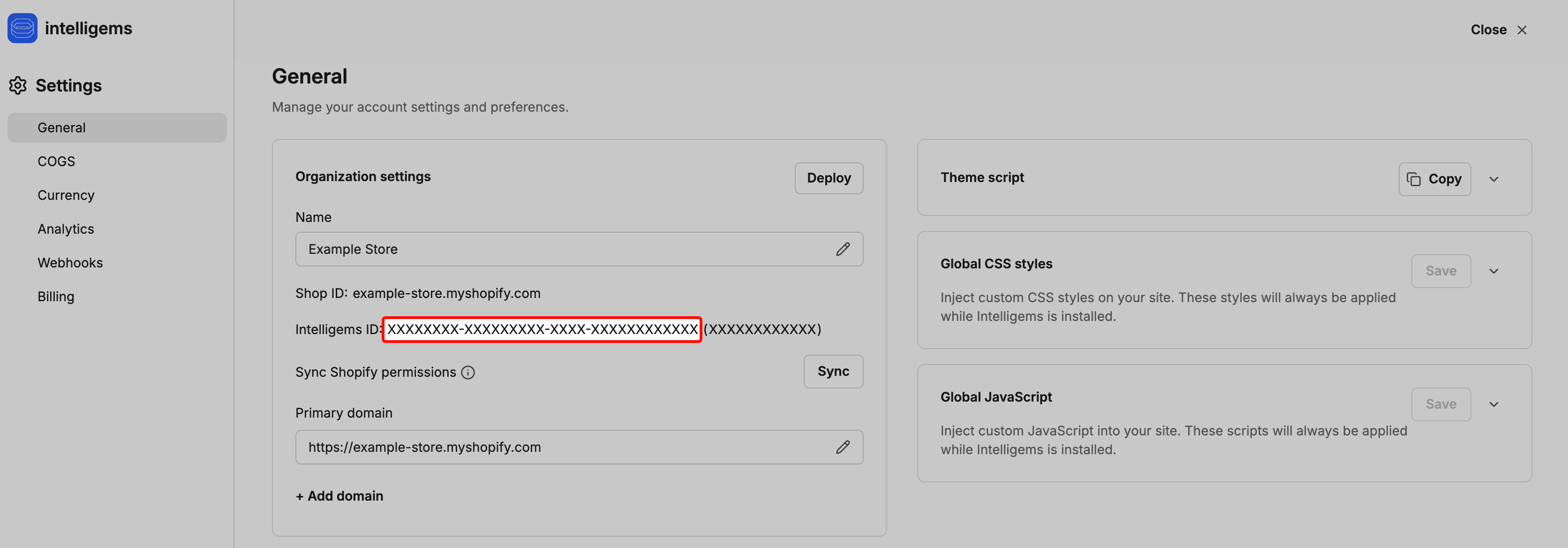
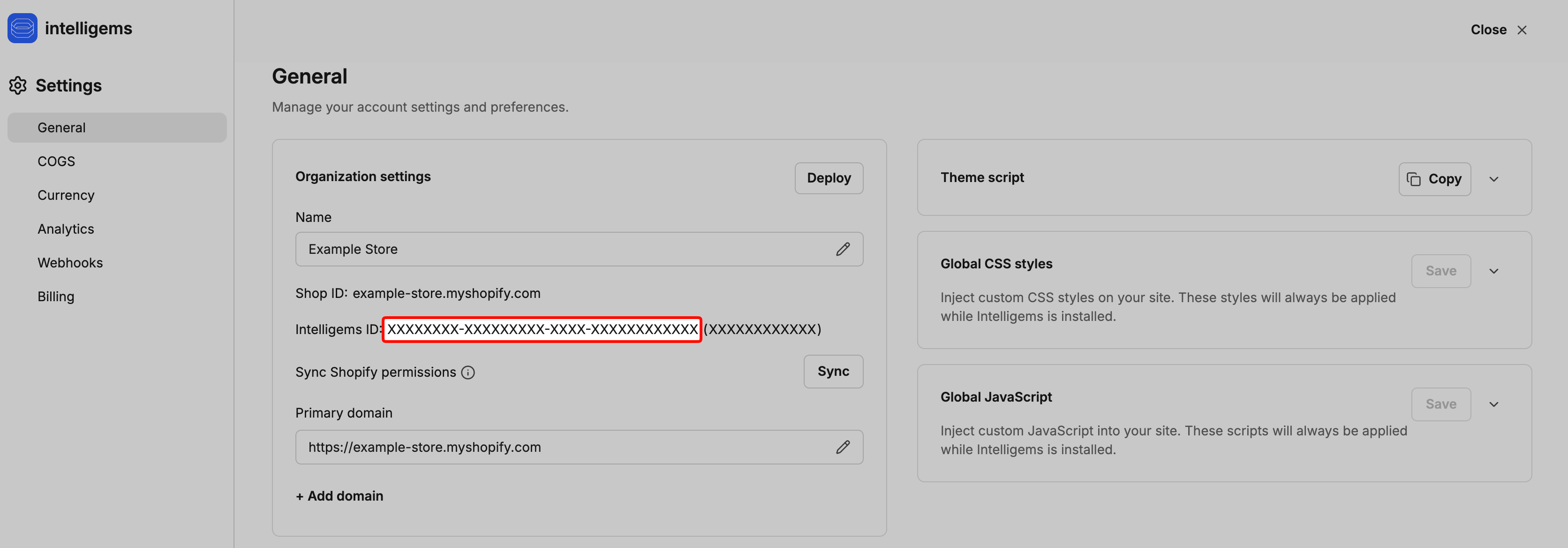
In [the Intelligems Settings page](https://app.intelligems.io/settings#general), go to **Settings → General → Organization Settings** and copy your **Intelligems ID**.
# Gatsby
{% hint style="info" %}
Version tracking is handled automatically by the provider; no additional SSR markup is required.
{% endhint %}
### Environment Variables
Add the following to your `.env` file:
```dotenv
GATSBY_INTELLIGEMS_ORG_ID=
GATSBY_STOREFRONT_ACCESS_TOKEN=
```
### Provider Integration
The [`IntelligemsGatsbyProvider`](https://headless.intelligems.io/gatsby-steps/add-intelligems-provider) component stores Intelligems data in React Context so hooks and components can access it throughout your app.
```tsx
import { IntelligemsGatsbyProvider } from "@intelligems/headless/gatsby";
export default function MyApp({ Component, pageProps }: AppProps) {
return (
<>
...
);
}
```
### Page Views Tracking
`useIgTrack` is a client-side hook tracking page views.
To provide accurate analytics ensure it is configured with valid parameters:
* `cartOrCheckoutToken`
* `currency`
* `country`
```tsx
import React from "react";
import {
IntelligemsGatsbyProvider,
useIgTrack,
} from "@intelligems/headless/gatsby";
const IntelligemsTracker = ({ children }) => {
const { checkout } = React.useContext(StoreContext);
useIgTrack({
cartOrCheckoutToken: checkout?.id,
currency: checkout?.totalTaxV2?.currencyCode,
country: "US",
});
return children;
};
export const wrapRootElement = ({ element }) => (
{element}
);
```
# Next.js | App router
{% hint style="info" %}
**Client Side Rendering**
Intelligems currently recommends using client-side rendering rather than SSR for Next.js App Router integrations to keep the implementation simple and avoid hydration mismatches.
{% endhint %}
{% hint style="warning" %}
ESM Errors
Depending on the setup of your site, you may encounter an `ERR_REQUIRE_ESM` error when using our package. Try adding the snippet below to `next.config.js` and/or reach out to support.
`transpilePackages: ['@intelligems/headless']`
{% endhint %}
### Environment Variables
Add the following to your `.env` file:
```dotenv
NEXT_PUBLIC_INTELLIGEMS_ORG_ID=
NEXT_PUBLIC_SHOPIFY_STOREFRONT_ACCESS_TOKEN=
```
### Provider Integration
The [`IntelligemsNextClientsideAppDirectoryProvider`](https://headless.intelligems.io/reference/providers/provider-props) component stores Intelligems data in React Context so hooks and components can access it throughout your app.
#### Integration Example
**IntelligemsProvider**
Create `IntelligemsProvider`:
```tsx
"use client";
import { IntelligemsNextClientsideAppDirectoryProvider } from "@intelligems/headless/next-clientside-app-directory";
export function IntelligemsProvider({
children,
}: {
children: React.ReactNode;
}) {
return (
{children}
);
}
```
**RootLayout**
Insert `IntelligemsProvider` inside your `RootLayout`:
```tsx
import { IntelligemsProvider } from "./intelligems-provider";
export default function RootLayout({
children,
}: {
children: React.ReactNode;
}) {
return (
{children}
);
}
```
### Page Views Tracking
`useIgTrack` is a client-side hook tracking page views.
To provide accurate analytics ensure it is configured with valid parameters:
* `cartOrCheckoutToken`
* `currency`
* `country`
**Create a client component**
```tsx
"use client";
import React from "react";
import { useIgTrack } from "@intelligems/headless/next-clientside-app-directory";
export function IntelligemsTracker() {
const { checkout } = React.useContext(StoreContext);
useIgTrack({
cartOrCheckoutToken: checkout?.id,
currency: checkout?.totalTaxV2?.currencyCode,
country: "US",
});
return null;
}
```
**Render it inside your provider wrapper**
```tsx
import { IntelligemsProvider } from "./intelligems-provider";
import { IntelligemsTracker } from "./intelligems-tracker";
export default function RootLayout({
children,
}: {
children: React.ReactNode;
}) {
return (
{children}
);
}
```
# Next.js | Pages router
{% hint style="warning" %}
ESM Errors
Depending on the setup of your site, you may encounter an `ERR_REQUIRE_ESM` error when using our package. Try adding the snippet below to `next.config.js` and/or reach out to support.
`transpilePackages: ['@intelligems/headless']`
{% endhint %}
### Environment Variables
Add the following to your `.env` file:
```dotenv
NEXT_PUBLIC_INTELLIGEMS_ORG_ID=
NEXT_PUBLIC_SHOPIFY_STOREFRONT_ACCESS_TOKEN=
```
### Provider Integration
The [`IntelligemsNextClientsideProvider`](https://headless.intelligems.io/reference/providers/provider-props) component stores Intelligems data in React Context so hooks and components can access it throughout your app.
#### Integration Example
```tsx
import { IntelligemsNextClientsideProvider } from "@intelligems/headless/next-clientside";
export default function MyApp({ Component, pageProps }: AppProps) {
return (
<>
...
);
}
```
#### Page Views Tracking
`useIgTrack` is a client-side hook tracking page views.
To provide accurate analytics ensure it is configured with valid parameters:
* `cartOrCheckoutToken`
* `currency`
* `country`
```tsx
import React from "react";
import {
IntelligemsNextClientsideProvider,
useIgTrack,
} from "@intelligems/headless/next-clientside";
const IntelligemsTracker = () => {
const { checkout } = React.useContext(StoreContext);
useIgTrack({
cartOrCheckoutToken: checkout?.id,
currency: checkout?.totalTaxV2?.currencyCode,
country: "US",
});
return null;
};
export default function MyApp({ Component, pageProps }: AppProps) {
return (
);
}
```
# Pack Digital
{% hint style="danger" %}
**Client-side Rendering is currently available**
We are currently only compatible with **SWC** minification (the default). The **Terser** minification with Pack Digital will **error out** during the build process.
{% endhint %}
### Environment Variables
Add the following to your `.env` file:
```dotenv
NEXT_PUBLIC_INTELLIGEMS_ORG_ID=
NEXT_PUBLIC_SHOPIFY_STOREFRONT_ACCESS_TOKEN=
```
### Provider Integration
The `IntelligemsPackProvider` component stores Intelligems data in React Context so hooks and components can access it throughout your app.
```tsx
import { IntelligemsPackProvider } from "@intelligems/headless/pack";
export default function MyApp({ Component, pageProps }: AppProps) {
return (
<>
...
);
}
```
### Page Views Tracking
`useIgTrack` is a client-side hook tracking page views.
To provide accurate analytics ensure it is configured with valid parameters:
* `cartOrCheckoutToken`
* `currency`
* `country`
```tsx
import React from "react";
import {
IntelligemsPackProvider,
useIgTrack,
} from "@intelligems/headless/pack";
const IntelligemsTracker = () => {
const { checkout } = React.useContext(StoreContext);
useIgTrack({
cartOrCheckoutToken: checkout?.id,
currency: checkout?.totalTaxV2?.currencyCode,
country: "US",
});
return null;
};
export default function App({ children }) {
return (
{children}
);
}
```
# Shopify Hydrogen / Remix
### Environment Variables
Add the following to your `.env` file:
```dotenv
INTELLIGEMS_ORG_ID=
SHOPIFY_STOREFRONT_ACCESS_TOKEN=
```
### Vite Configuration
Add the `intelligemsVitePlugin` to your `vite.config.ts` plugins array. This plugin is required for the Intelligems Preview Mode widget to render and function correctly in Hydrogen apps. This plugin should be placed at the end / near the end of the plugins array, after the `hydrogen` and `oxygen` plugins.
#### **Why is this needed?**
The `oxygen()` Vite plugin from `@shopify/mini-oxygen` sets `resolve.conditions` to `["worker", "workerd"]` globally, which causes client-side dependencies like `@emotion/*` and `@mui/*` to resolve server/edge build variants instead of browser builds. This breaks CSS injection and component interactivity in the Preview Mode widget.
The `intelligemsVitePlugin` moves these conditions to `ssr.resolve.conditions` where they belong, so that only server-side code uses worker builds while client-side code correctly resolves browser builds.
#### **Is this safe?**
The plugin has zero runtime cost — it runs once during Vite config resolution. Client-side code runs in the browser, not in a worker, so it should never have `worker` conditions applied. SSR behavior is completely unaffected since the worker conditions are preserved under `ssr.resolve.conditions`.
```tsx
import { defineConfig } from "vite";
import { hydrogen } from "@shopify/hydrogen/vite";
import { oxygen } from "@shopify/mini-oxygen/vite";
import { vitePlugin as remix } from "@remix-run/dev";
import { intelligemsVitePlugin } from "@intelligems/headless/hydrogen";
export default defineConfig({
plugins: [
hydrogen(),
oxygen(),
remix({
presets: [hydrogen.preset()],
future: {
v3_fetcherPersist: true,
v3_relativeSplatPath: true,
v3_throwAbortReason: true,
v3_lazyRouteDiscovery: true,
},
}),
tsconfigPaths(),
intelligemsVitePlugin(),
],
ssr: {
optimizeDeps: {
include: ["@intelligems/headless/hydrogen"],
},
},
});
```
### loader() Configuration
Update the `loader()` function to pre-load the Intelligems configuration. Optionally pass in a cache interval (in minutes).
### Provider Integration
The `IntelligemsHydrogenProvider` component stores Intelligems data in React Context so hooks and components can access it throughout your app.
```tsx
import { IntelligemsHydrogenProvider } from "@intelligems/headless/hydrogen";
export default function MyApp({ Component, pageProps }: AppProps) {
return (
<>
...
);
}
```
### Page Views Tracking
`useIgTrack` is a client-side hook tracking page views.
To provide accurate analytics ensure it is configured with valid parameters:
* `cartOrCheckoutToken`
* `currency`
* `country`
```tsx
import {
IntelligemsHydrogenProvider,
useIgTrack,
} from "@intelligems/headless/hydrogen";
import { ClientOnly } from "remix-utils/client-only";
const IntelligemsTracker = ({
cartOrCheckoutToken,
currency,
country,
}: {
cartOrCheckoutToken: string | undefined | null;
currency: string | undefined | null;
country: string | undefined | null;
}) => {
useIgTrack({
cartOrCheckoutToken,
currency,
country,
});
return null;
};
export default function App({ children }) {
return (
{() => (
)}
{children}
);
}
```
# Providers
Intelligems providers initialize the client, fetch configuration, and expose the Intelligems context used by hooks and components. Choose the provider that matches your framework entry point:
* `IntelligemsNextClientsideProvider` from `@intelligems/headless/next-clientside`
* `IntelligemsNextClientsideAppDirectoryProvider` from `@intelligems/headless/next-clientside-app-directory`
* `IntelligemsGatsbyProvider` from `@intelligems/headless/gatsby`
* `IntelligemsPackProvider` from `@intelligems/headless/pack`
* `IntelligemsHydrogenProvider` from `@intelligems/headless/hydrogen`
All providers accept the same `IntelligemsProviderProps`.
# Provider Props
## `IntelligemsProviderProps`
```tsx
export type ActiveCurrency = string | (() => string);
export type PriceFormat = "dollars" | "cents";
export type PriceFormatter = (value: number, currencyCode?: string) => string;
export type IntelligemsProviderProps = {
children?: React.ReactNode;
organizationId: string;
activeCurrencyCode: ActiveCurrency;
storefrontApiToken: string;
debug?: boolean;
priceFormat?: PriceFormat;
antiFlicker?: boolean;
config?: PluginConfigType;
cacheIntervalMinutes?: number;
noShadowRoot?: boolean;
};
```
# Components
Headless components are lightweight wrappers around the hooks, designed to be drop-in replacements for storefront price rendering.
# Price Components
These components use `useIgPrices()` internally. See [docs](/reference/hooks/price-hooks) for details on price-return logic.
## `` and ``
The [``](#less-than-igprice-greater-than) and `` components are recommended when you want a drop-in replacement for storefront prices. They automatically pick the active test group pricing (when available) and apply Integration Mode styling.
The `priceFormatter` prop may be used to format the returned price for your site (for example, to add localized currency formatting).
```tsx
export type PriceFormatter = (value: number, currencyCode?: string) => string;
export interface IgBasePriceProps {
className?: string;
productId?: string;
variantId?: string;
currencyCode?: string;
priceFormatter?: PriceFormatter;
}
export interface IgPriceProps extends IgBasePriceProps {
originalPrice: number | string;
}
export interface IgCompareAtPriceProps extends IgBasePriceProps {
originalCompareAtPrice?: number | string;
}
```
## ``
Lower-level component that renders from an existing `useIgPrices()` return value. This powers `` and ``.
```tsx
import type { PriceFormatter, UseIgPricesReturn } from "@intelligems/headless";
type IgBasePriceProps = {
className?: string;
igPrices: UseIgPricesReturn;
isCompareAtPrice: boolean;
priceFormatter?: PriceFormatter;
};
```
## ``
Lowest-level price renderer used by ``.
```tsx
import type {
IgPriceReturn,
PriceFormat,
PriceFormatter,
} from "@intelligems/headless";
export interface PriceProps {
isIgPrice: boolean;
igPrice?: IgPriceReturn;
priceFormat: PriceFormat;
priceFormatter?: PriceFormatter;
integration?: boolean;
className?: string;
isCompareAtPrice: boolean;
}
```
# Hooks
The headless package exposes hooks for prices, experiences, variations, offers, tracking, and cart attributes. See the individual pages for full details.
# Price Hooks
`useIgPrices()` returns the price (and compare-at price) for the currently assigned variation when one is available. When no eligible experience is found or the experience is not ready, the hook falls back to the original price inputs and marks `isIgPrice` as `false`.
High-level behavior:
1. If no `productId` or `variantId` is provided, the hook returns a best-effort conversion of `originalPrice` / `originalCompareAtPrice` (if provided) and sets `isIgPrice: false`.
2. If the product/variant is part of an active experience and the user has a resolved variation assignment, the hook returns the assigned test price and sets `isIgPrice: true`.
3. If the experience is pending assignment or the experience is in preview but the user is not (or vice-versa), the hook returns original prices and sets `isReady` accordingly.
## `useIgPrices()`
Returns the product price based on the user's test group. Intelligems will return the original prices if updated prices are not found. You may pass in an object with the required data or an array of objects. If an array is passed in, the response will be an object keyed by `variantId`.
When passing an array, the return value is an object keyed by `variantId`. Use `isIgMultiPriceReturn()` to type-guard the multi-return shape.
## `useIgStyles`
Useful for manually styling components for integration mode.
```tsx
const igStyles = useIgStyles(isIgPrice);
```
# Offer Hooks
Offer hooks return `OfferEntity` objects from `@intelligems/ig-types`. They are resolved based on the user's assigned variation for the experience.
## `useIgOffer()`
Returns the offer for the user's assigned variation for the given experience.
```typescript
const useIgOffer = (experienceId: string) => {
isReady: boolean;
offer: OfferEntity | null;
};
```
## `useIgOfferTier()`
Returns the offer tier for the user's assigned variation based on unit count.
```typescript
const useIgOfferTier = (experienceId: string, units: number) => {
isReady: boolean;
tier: OfferEntity["tiers"][number] | null;
};
```
## `useIgOffers()`
Returns every offer for the experience (across all variations), once the experience assignment is ready.
```typescript
const useIgOffers = (experienceId: string) => {
isReady: boolean;
offers: OfferEntity[] | null;
};
```
# Track Hooks
## `useIgTrack()`
Required to gather analytics data. This hook runs client-side and is exported from the framework-specific entry points (for example, `@intelligems/headless/next-clientside`, `@intelligems/headless/next-clientside-app-directory`, `@intelligems/headless/gatsby`, `@intelligems/headless/pack`, and `@intelligems/headless/hydrogen`).
It wires up:
* Page view tracking
* Cart attribute updates via `useIgCart`
* Custom events setup via `useIgCustomEvents`
* GA4 variation tracking via `useIgGaTrack`
The host site should provide each prop in whichever way best suits the site integration.
`location` is only used by the Hydrogen hook to override `window.location`.
## `useIgGaTrack()`
Optional standalone hook for GA4 variation tracking if you are not using `useIgTrack()`.
## `useIgCustomEvents()`
Optional standalone hook for initializing `window.igEvents` if you are not using `useIgTrack()`.
## `useIgIntegrations()`
Use this hook to send variation assignments to supported analytics integrations (Clarity, Hotjar, Heatmap).
```typescript
import type { HeadlessSupportedIntegration } from "@intelligems/ig-types";
useIgIntegrations(["Clarity", "Hotjar"]);
```
## `useIgIsIntegration()`
Returns `true` when the current session is in Integration Mode.
# Experience Hooks
## `useIgExperiences()`
Returns a list of experiences the user is assigned to (filtered to active experiences). The returned items are `PluginExperienceType` objects from `@intelligems/ig-types`.
import type { PluginExperienceType } from "@intelligems/ig-types";

const useIgExperiences: () => {
    isReady: boolean;
    experiences: PluginExperienceType[]
}
## `useIgConfigExperiences()`
Returns all experiences from the active Intelligems configuration file.
## `useIgPreviewedExperience()`
Returns the experience currently being previewed (or `null` if preview mode is inactive or set to preview all traffic).
```typescript
const useIgPreviewedExperience: () => PluginExperienceType | null;
```
# Variation Hooks
## `useIgVariations()`
Returns the list of variations the user is assigned to, including any redirect metadata for those variations.
```typescript
import type { HeadlessVariationWithRedirects } from "@intelligems/headless";
const useIgVariations: () => {
isReady: boolean;
variations: HeadlessVariationWithRedirects[];
};
```
## `useIgVariation()`
Returns the assigned variation for the given experience, including redirect metadata.
```typescript
const useIgVariation: (experienceId: string) => {
isReady: boolean;
variation: HeadlessVariationWithRedirects | null;
};
```
## `useIgShippingVariation()`
Returns the assigned variation for the shipping experience (if configured).
```typescript
import type { PluginVariationType } from "@intelligems/ig-types";
const useIgShippingVariation: () => {
isReady: boolean;
variation: PluginVariationType | null;
};
```
# Cart & Checkout Hooks
## `useIgCart()`
Use this hook if your site manages user carts through the Storefront **Cart** API.
Requires the `cartOrCheckoutToken` (cart ID). The hook will add cart attributes needed for experiments and optionally backfill currency based on the cart.
Returns a `wrapCustomAttributes` function. This function will add Intelligems-required line item properties to any existing line item properties (for example, for shipping tests).
## `useIgCartAttributes()`
Returns the attribute array you can attach when creating or updating carts in custom Storefront API flows.
```typescript
const useIgCartAttributes: () => {
isReady: boolean;
attributes: { key: string; value: string }[];
};
```
# Utilities
## `getIntelligemsConfig()`
Fetches the Intelligems headless configuration for an organization.
```ts
import { getIntelligemsConfig } from "@intelligems/headless";
const config = await getIntelligemsConfig("org_id", 5);
```
```ts
import type { PluginConfigType } from "@intelligems/ig-types";
const getIntelligemsConfig: (
organizationId: string,
cacheIntervalMinutes?: number
) => Promise;
```
## `setLogLevel()`
Sets the internal logger level. Allowed values are `"DEBUG"`, `"INFO"`, `"WARNING"`, and `"ERROR"`.
```ts
import { setLogLevel } from "@intelligems/headless";
setLogLevel("INFO");
```
```ts
const setLogLevel: (level: "DEBUG" | "INFO" | "WARNING" | "ERROR") => void;
```
## `IntelligemsContext`
React context that exposes the Intelligems client state.
```tsx
import { IntelligemsContext } from "@intelligems/headless";
const { data } = useContext(IntelligemsContext);
```
# Update Prices on Page
## The `` Component
The [``](/reference/components/price-components#less-than-igprice-greater-than) component is recommended as it automatically applies assigned test prices and uses Integration Mode styling.
## The `useIgPrices()` Hook
The [`useIgPrices()`](/reference/hooks/price-hooks#useigprices) hook may be used to pull updated prices based on the user's test group and then render the result however your storefront needs.
## Internationalization
1. Set a default `activeCurrencyCode` prop for the provider. `USD` will be used by default if not set.
2. If necessary, update `activeCurrencyCode` through context:
```typescript
const { dispatchData } = useContext(IntelligemsContext);
dispatchData({
type: "SET_ACTIVE_CURRENCY_CODE",
payload: "EUR",
});
```
3. Experiment currency is set through the Intelligems app. Prices for experiments with a currency that does not match `activeCurrencyCode` will return the original price.
# Update ATC Events
# Shopify Functions
## Add `useIgCart()`
* Use the [`useIgCart()`](/reference/hooks/cart-and-checkout-hooks#useigcart) hook if your site uses the Storefront **Cart** API.
* The `wrapCustomAttributes` helper is only needed if you're performing shipping tests or need line item properties added to ATC requests.
## Add `useIgCartAttributes()` (optional)
If you build carts manually (for example, via `cartCreate` or `cartLinesAdd`), use [`useIgCartAttributes()`](/reference/hooks/cart-and-checkout-hooks#useigcartattributes) for the attributes payload that should be included in your cart requests.
# Shopify Plus + Scripts
{% hint style="info" %}
Shopify is deprecating Checkout Scripts! Intelligems highly recommends using functions instead.
{% endhint %}
## Add `useIgCart()`
* Use the [`useIgCart()`](/reference/hooks/cart-and-checkout-hooks#useigcart) hook if your site uses the Storefront **Cart** API.
* Wrap ATC calls with the `wrapCustomAttributes` function returned by `useIgCart` when you need line item properties (for example, shipping tests).
## Add Intelligems Script to `checkout.liquid`
The Intelligems script may be found under *settings* at [app.intelligems.io](https://app.intelligems.io). Copy this script tag and add it to the header of `checkout.liquid`.
## Add Intelligems Checkout Script to Script Editor
Add the following script to your Script Editor app as a line item discount.
{% code overflow="wrap" %}
```ruby
class Intelligems
def initialize(discount_property = '_igp', allow_free = false)
@volume_discount_property = '_igvd'
@volume_discount_message_property = '_igvd_message'
@depreciated_property = '_igLineItemDiscount'
@discount_property = discount_property
@allow_free = allow_free
end
def discount_product(line_item)
ig_price = Money.new(cents: line_item.properties[@discount_property])
discount = line_item.line_price - ig_price
if discount > Money.zero
discount *= line_item.quantity
line_item.change_line_price(line_item.line_price - discount, message: 'Discount')
end
end
def depreciated_discount_product(line_item)
discount = Money.new(cents: line_item.properties[@depreciated_property])
discount *= line_item.quantity
if @allow_free or discount < line_item.line_price
line_item.change_line_price(line_item.line_price - discount, message: 'Intelligems')
end
end
def volume_discount(line_item)
discount = Money.new(cents: line_item.properties[@volume_discount_property])
discount *= line_item.quantity
if discount < line_item.line_price
message = line_item.properties[@volume_discount_message_property]
line_item.change_line_price(line_item.line_price - discount, message: message)
end
end
def run(cart)
cart.line_items.each do |line_item|
if !line_item.properties[@discount_property].nil? && !line_item.properties[@discount_property].empty?
discount_product(line_item)
elsif !line_item.properties[@volume_discount_property].nil? && !line_item.properties[@volume_discount_property].empty?
volume_discount(line_item)
elsif !line_item.properties[@depreciated_property].nil? && !line_item.properties[@depreciated_property].empty?
depreciated_discount_product(line_item)
end
end
end
end
intelligems = Intelligems.new()
intelligems.run(Input.cart)
Output.cart = Input.cart
```
{% endcode %}
# Preview Your Site
## Preview Mode
Preview mode will update prices on the page for experiences in Preview Mode. Enter Preview Mode by adding the `ig-preview=true` query string parameter.
### Entering a Specific Experience
You can preview a specific experience by adding the below to the end of your site's URL:
`/?ig-preview=EXPERIENCE-ID`
where `EXPERIENCE-ID` is the ID for the experience or personalization you would like to preview. You can find the ID by heading to the A/B Tests tab in the Intelligems app, clicking on the three dots / more options menu next to the experience you are working on, and selecting "Show Info". This will bring up both the experience ID and the variation IDs. Click on the long ID for the experience you'd like to preview to copy it to your clipboard.
The final results should look something like this:
`www.mywebsite.com/?ig-preview=24d3c894-210a-4300-bae0-8388ee54f495`
### Entering a Specific Variation
You can force yourself into a specific variation by adding the below to the end of your site's URL:
`/?igTg=VARIATION-ID`
where `VARIATION-ID` is the ID for the variation you would like to be forced into. You can find the variation ID by heading to the A/B Tests tab in the Intelligems app, clicking on the three dots / more options menu next to the experience you are working on, and selecting "Show Info".
The final results should look something like this:
`www.mywebsite.com/?igTg=44bae2e6-dbc3-4fc1-a68d-4218ac04f99c`
## Integration Mode
Integration Mode will color prices using the [``](/reference/components/price-components#less-than-igprice-greater-than) component. Enter Integration Mode by adding the `ig-integration=true` query string parameter.
* **Green** highlighting means Intelligems changed the price
* **Blue** highlighting means Intelligems did not change the price
The `useIgStyles` hook may be used to manually style price elements:
```tsx
const styles = useIgStyles(isIgPrice);
```
# Lite Mode
By default, this package exports the Preview Widget component, which makes switching experiments and variations easier. If you would like to disable this (to reduce bundle size), use one of the `-lite` entry points.
To enable, update **all** imports to pull from `-lite`. For example:
Update: `import { IntelligemsHydrogenProvider } from "@intelligems/headless/hydrogen"`
to:
`import { IntelligemsHydrogenProvider } from "@intelligems/headless/hydrogen-lite"`
Available lite entry points:
* `@intelligems/headless/next-clientside-lite`
* `@intelligems/headless/next-clientside-app-directory-lite`
* `@intelligems/headless/gatsby-lite`
* `@intelligems/headless/pack-lite`
* `@intelligems/headless/hydrogen-lite`
# Custom Events
## **General Information**
{% embed url="" %}
## **API**
Custom events are available after you call `useIgTrack()` (or `useIgCustomEvents()` directly). Track an event by calling `igEvents.push()`. The object passed into `push` accepts two parameters:
```html
window.igEvents.push({"event": "myCustomEventName"});
```
`event`: the name of your event, meant to uniquely identify the action you're tracking. This will be used to categorize events when viewing analytics in our dashboard.
{% hint style="info" %}
Commas, single quotes, and trailing spaces will be stripped from event names
{% endhint %}
`properties`: arbitrary key value pairs, anything goes as long as it's valid JSON. Use this to add context relevant to the `event`. It'll help you create more fine-grained queries among a single `event` when digging into your analytics.
{% hint style="danger" %}
Properties will be saved for future use, but are not currently available for analysis in Intelligems analytics.
{% endhint %}
## **Intelligems Context**
Intelligems appends other meaningful metadata to your events. This lets you associate custom event flows with actionable outcomes that Intelligems tracks by default. Includes but not limited to:
* Intelligems assigned unique user identifier, set in local storage so it persists across sessions
* Test groups the user is assigned to for any active experience
* Campaigns the user is included in
# Content Testing
Use content testing to show different site content per Test Group.
```tsx
const SomeComponent = () => {
const experienceId = "";
const variation = useIgVariation(experienceId);
const DynamicComponent = useMemo(() => {
if (variation.isReady) {
if (variation.variation?.name === "New Group 1") {
return (
This component only renders if the Variation is "New Group 1"
);
} else {
return (
This component only renders if the Variation is the Control Group
);
}
} else {
// Intelligems configuration has not loaded yet, or
// Intelligems configuration never requested
return null;
}
}, [variation]);
return
{DynamicComponent}
;
};
```
# Gift With Purchases
Additions and removals of gift-with-purchase items must be handled by the site. In general, the following steps are needed:
1. Determine if the cart qualifies for a GWP.
1. If yes, follow the *Add GWP steps* below.
2. If no, remove the GWP if it's already in the cart.
### Add GWP Steps
```typescript
const experienceId = "abc123";
const { offer } = useIgOffer(experienceId);
const { tier } = useIgOfferTier(experienceId, units);
if (offer && tier?.isGiftWithPurchase) {
const giftWithPurchaseProductId = tier.giftWithPurchaseProductId;
const giftWithPurchaseVariantId = tier.giftWithPurchaseVariantId;
const lineItemProperty = {
key: "_igGWP",
value: offer.id.split("-").pop(),
};
// Add item to the cart with the above line item property.
}
```
# Introduction
**`@intelligems/headless`** is Intelligems' official NPM package for integrating price testing, A/B testing, and personalization into **headless storefronts**.
{% hint style="info" %}
Make sure to have an active subscription to [Intelligems](https://www.intelligems.io) before continuing.
{% endhint %}
**How it works**
The provider loads your experiment config server-side, assigns users to groups, and then exposes pricing/content data via React context. Components can read that context to render the right price or content variant for each visitor — without any flicker, because the config is available before render.
# Change Log
## 1.2.9
Update Shopify GraphQL version.
## 1.1.0
* Personalization and Gift with Purchase support
* Shipping test support
* Several new hooks:
* `useIgOffer`
* `useIgOfferTier`
* `useIgOffers`
* Bugfix - fetch cart/checkout before updating attributes in order to persist existing attributes.
## 1.0.0 - Major Release
### Breaking Changes
1. `useIgExperiments` is no longer avaible. It is now `useIgExperiences`.
2. `useIgTestGroups` is no longer available. It is now `useIgVariations`.
3. `useIgTestGroup` is now longer available. It is now `useIgVariation`.
4. `useIgCheckout` is no longer available. It has been combined with `useIgCart.`
### New Features
* Preview mode now more closely aligns with our non-headless preview mode.
* Previews are now loaded individually.
* `useIgStyles` - Exports colors to show price changes in integration mode.
* `useIgPreviewedExperience` - Returns the experience actively being previewed.
* `useIgConfigExperiences` - Returns all experiences in the current configuration file.
* Exclusion Groups are now supported.
* Custom Events are now supported.
## 0.4.0
* Feature - Update package to use the latest Traffic Config and Page Targeting features.
## 0.3.3
* Bugfix - Unassigned users incorrectly marked as excluded in track event.
## 0.3.2
* Feature - Add support for passing ids as Query Parameters during redirect tests.
## 0.3.1
* Bugfix - Don't send track events when changing tabs.
## 0.3.0
* NEW:
* Next.js App Directory design support.
* Next.js only: send track events on page unload.
## 0.2.8
* Add redirect support - Keep user unassigned until visiting redirect origin url.
## 0.2.7
* Internal improvements to logging.
## 0.2.6
* Internal improvements to Google Analytics tracking.
## 0.2.5
* Internal improvements to Google Analytics tracking.
## 0.2.4
* Internal change to bypass Intelligem's CDN when developing locally.
## 0.2.0
* `useIgCart` now runs within `useIgTrack` , in case customer forgets to use `useIgCart`
* Intelligems Preview Widget is now draggable.
* Enabled configuration and version tracking.
* Intelligems package version tag included within SRR HTML
## 0.1.9
### New Features
* GA4 Support
## 0.1.4
### Breaking Changes
* The hooks now return objects with a `isReady` state. `isReady` returns `true` once the Intelligems configuration file is downloaded and stored in React Context.
### New Features
* Pack Digital support added.
* Preview mode now displays a Test Group Switcher component.
# Requirements
### Package Installation
Add the `@intelligems/headless` package to your repository
{% tabs %}
{% tab title="NPM" %}
```shellscript
npm install --save @intelligems/headless
```
{% endtab %}
{% tab title="PNPM" %}
```shellscript
pnpm add @intelligems/headless
```
{% endtab %}
{% tab title="Python" %}
```shellscript
yarn add @intelligems/headless
```
{% endtab %}
{% endtabs %}
### Copy your Intelligems ID
In [the Intelligems Settings page](https://app.intelligems.io/settings#general), go to **Settings → General → Organization Settings** and copy your **Intelligems ID**.
# Gatsby
{% hint style="info" %}
Version tracking is handled automatically by the provider; no additional SSR markup is required.
{% endhint %}
### Environment Variables
Add the following to your `.env` file:
```dotenv
GATSBY_INTELLIGEMS_ORG_ID=
GATSBY_STOREFRONT_ACCESS_TOKEN=
```
### Provider Integration
The [`IntelligemsGatsbyProvider`](https://headless.intelligems.io/gatsby-steps/add-intelligems-provider) component stores Intelligems data in React Context so hooks and components can access it throughout your app.
```tsx
import { IntelligemsGatsbyProvider } from "@intelligems/headless/gatsby";
export default function MyApp({ Component, pageProps }: AppProps) {
return (
<>
...
);
}
```
### Page Views Tracking
`useIgTrack` is a client-side hook tracking page views.
To provide accurate analytics ensure it is configured with valid parameters:
* `cartOrCheckoutToken`
* `currency`
* `country`
```tsx
import React from "react";
import {
IntelligemsGatsbyProvider,
useIgTrack,
} from "@intelligems/headless/gatsby";
const IntelligemsTracker = ({ children }) => {
const { checkout } = React.useContext(StoreContext);
useIgTrack({
cartOrCheckoutToken: checkout?.id,
currency: checkout?.totalTaxV2?.currencyCode,
country: "US",
});
return children;
};
export const wrapRootElement = ({ element }) => (
{element}
);
```
# Next.js | App router
{% hint style="info" %}
**Client Side Rendering**
Intelligems currently recommends using client-side rendering rather than SSR for Next.js App Router integrations to keep the implementation simple and avoid hydration mismatches.
{% endhint %}
{% hint style="warning" %}
ESM Errors
Depending on the setup of your site, you may encounter an `ERR_REQUIRE_ESM` error when using our package. Try adding the snippet below to `next.config.js` and/or reach out to support.
`transpilePackages: ['@intelligems/headless']`
{% endhint %}
### Environment Variables
Add the following to your `.env` file:
```dotenv
NEXT_PUBLIC_INTELLIGEMS_ORG_ID=
NEXT_PUBLIC_SHOPIFY_STOREFRONT_ACCESS_TOKEN=
```
### Provider Integration
The [`IntelligemsNextClientsideAppDirectoryProvider`](https://headless.intelligems.io/reference/providers/provider-props) component stores Intelligems data in React Context so hooks and components can access it throughout your app.
#### Integration Example
**IntelligemsProvider**
Create `IntelligemsProvider`:
```tsx
"use client";
import { IntelligemsNextClientsideAppDirectoryProvider } from "@intelligems/headless/next-clientside-app-directory";
export function IntelligemsProvider({
children,
}: {
children: React.ReactNode;
}) {
return (
{children}
);
}
```
**RootLayout**
Insert `IntelligemsProvider` inside your `RootLayout`:
```tsx
import { IntelligemsProvider } from "./intelligems-provider";
export default function RootLayout({
children,
}: {
children: React.ReactNode;
}) {
return (
{children}
);
}
```
### Page Views Tracking
`useIgTrack` is a client-side hook tracking page views.
To provide accurate analytics ensure it is configured with valid parameters:
* `cartOrCheckoutToken`
* `currency`
* `country`
**Create a client component**
```tsx
"use client";
import React from "react";
import { useIgTrack } from "@intelligems/headless/next-clientside-app-directory";
export function IntelligemsTracker() {
const { checkout } = React.useContext(StoreContext);
useIgTrack({
cartOrCheckoutToken: checkout?.id,
currency: checkout?.totalTaxV2?.currencyCode,
country: "US",
});
return null;
}
```
**Render it inside your provider wrapper**
```tsx
import { IntelligemsProvider } from "./intelligems-provider";
import { IntelligemsTracker } from "./intelligems-tracker";
export default function RootLayout({
children,
}: {
children: React.ReactNode;
}) {
return (
{children}
);
}
```
# Next.js | Pages router
{% hint style="warning" %}
ESM Errors
Depending on the setup of your site, you may encounter an `ERR_REQUIRE_ESM` error when using our package. Try adding the snippet below to `next.config.js` and/or reach out to support.
`transpilePackages: ['@intelligems/headless']`
{% endhint %}
### Environment Variables
Add the following to your `.env` file:
```dotenv
NEXT_PUBLIC_INTELLIGEMS_ORG_ID=
NEXT_PUBLIC_SHOPIFY_STOREFRONT_ACCESS_TOKEN=
```
### Provider Integration
The [`IntelligemsNextClientsideProvider`](https://headless.intelligems.io/reference/providers/provider-props) component stores Intelligems data in React Context so hooks and components can access it throughout your app.
#### Integration Example
```tsx
import { IntelligemsNextClientsideProvider } from "@intelligems/headless/next-clientside";
export default function MyApp({ Component, pageProps }: AppProps) {
return (
<>
...
);
}
```
#### Page Views Tracking
`useIgTrack` is a client-side hook tracking page views.
To provide accurate analytics ensure it is configured with valid parameters:
* `cartOrCheckoutToken`
* `currency`
* `country`
```tsx
import React from "react";
import {
IntelligemsNextClientsideProvider,
useIgTrack,
} from "@intelligems/headless/next-clientside";
const IntelligemsTracker = () => {
const { checkout } = React.useContext(StoreContext);
useIgTrack({
cartOrCheckoutToken: checkout?.id,
currency: checkout?.totalTaxV2?.currencyCode,
country: "US",
});
return null;
};
export default function MyApp({ Component, pageProps }: AppProps) {
return (
);
}
```
# Pack Digital
{% hint style="danger" %}
**Client-side Rendering is currently available**
We are currently only compatible with **SWC** minification (the default). The **Terser** minification with Pack Digital will **error out** during the build process.
{% endhint %}
### Environment Variables
Add the following to your `.env` file:
```dotenv
NEXT_PUBLIC_INTELLIGEMS_ORG_ID=
NEXT_PUBLIC_SHOPIFY_STOREFRONT_ACCESS_TOKEN=
```
### Provider Integration
The `IntelligemsPackProvider` component stores Intelligems data in React Context so hooks and components can access it throughout your app.
```tsx
import { IntelligemsPackProvider } from "@intelligems/headless/pack";
export default function MyApp({ Component, pageProps }: AppProps) {
return (
<>
...
);
}
```
### Page Views Tracking
`useIgTrack` is a client-side hook tracking page views.
To provide accurate analytics ensure it is configured with valid parameters:
* `cartOrCheckoutToken`
* `currency`
* `country`
```tsx
import React from "react";
import {
IntelligemsPackProvider,
useIgTrack,
} from "@intelligems/headless/pack";
const IntelligemsTracker = () => {
const { checkout } = React.useContext(StoreContext);
useIgTrack({
cartOrCheckoutToken: checkout?.id,
currency: checkout?.totalTaxV2?.currencyCode,
country: "US",
});
return null;
};
export default function App({ children }) {
return (
{children}
);
}
```
# Shopify Hydrogen / Remix
### Environment Variables
Add the following to your `.env` file:
```dotenv
INTELLIGEMS_ORG_ID=
SHOPIFY_STOREFRONT_ACCESS_TOKEN=
```
### Vite Configuration
Add the `intelligemsVitePlugin` to your `vite.config.ts` plugins array. This plugin is required for the Intelligems Preview Mode widget to render and function correctly in Hydrogen apps. This plugin should be placed at the end / near the end of the plugins array, after the `hydrogen` and `oxygen` plugins.
#### **Why is this needed?**
The `oxygen()` Vite plugin from `@shopify/mini-oxygen` sets `resolve.conditions` to `["worker", "workerd"]` globally, which causes client-side dependencies like `@emotion/*` and `@mui/*` to resolve server/edge build variants instead of browser builds. This breaks CSS injection and component interactivity in the Preview Mode widget.
The `intelligemsVitePlugin` moves these conditions to `ssr.resolve.conditions` where they belong, so that only server-side code uses worker builds while client-side code correctly resolves browser builds.
#### **Is this safe?**
The plugin has zero runtime cost — it runs once during Vite config resolution. Client-side code runs in the browser, not in a worker, so it should never have `worker` conditions applied. SSR behavior is completely unaffected since the worker conditions are preserved under `ssr.resolve.conditions`.
```tsx
import { defineConfig } from "vite";
import { hydrogen } from "@shopify/hydrogen/vite";
import { oxygen } from "@shopify/mini-oxygen/vite";
import { vitePlugin as remix } from "@remix-run/dev";
import tsconfigPaths from "vite-tsconfig-paths";
import { intelligemsVitePlugin } from "@intelligems/headless/hydrogen";
export default defineConfig({
plugins: [
hydrogen(),
oxygen(),
remix({
presets: [hydrogen.preset()],
future: {
v3_fetcherPersist: true,
v3_relativeSplatPath: true,
v3_throwAbortReason: true,
v3_lazyRouteDiscovery: true,
},
}),
tsconfigPaths(),
intelligemsVitePlugin(),
],
ssr: {
optimizeDeps: {
include: ["@intelligems/headless/hydrogen"],
},
},
});
```
### loader() Configuration
Update the `loader()` function to pre-load the Intelligems configuration. Optionally pass in a cache interval (in minutes).
### Provider Integration
The `IntelligemsHydrogenProvider` component stores Intelligems data in React Context so hooks and components can access it throughout your app.
```tsx
import { IntelligemsHydrogenProvider } from "@intelligems/headless/hydrogen";
export default function MyApp({ Component, pageProps }: AppProps) {
return (
<>
...
);
}
```
### Page Views Tracking
`useIgTrack` is a client-side hook tracking page views.
To provide accurate analytics ensure it is configured with valid parameters:
* `cartOrCheckoutToken`
* `currency`
* `country`
```tsx
import {
IntelligemsHydrogenProvider,
useIgTrack,
} from "@intelligems/headless/hydrogen";
import { ClientOnly } from "remix-utils/client-only";
const IntelligemsTracker = ({
cartOrCheckoutToken,
currency,
country,
}: {
cartOrCheckoutToken: string | undefined | null;
currency: string | undefined | null;
country: string | undefined | null;
}) => {
useIgTrack({
cartOrCheckoutToken,
currency,
country,
});
return null;
};
export default function App({ children }) {
return (
{() => (
)}
{children}
);
}
```
# Providers
Intelligems providers initialize the client, fetch configuration, and expose the Intelligems context used by hooks and components. Choose the provider that matches your framework entry point:
* `IntelligemsNextClientsideProvider` from `@intelligems/headless/next-clientside`
* `IntelligemsNextClientsideAppDirectoryProvider` from `@intelligems/headless/next-clientside-app-directory`
* `IntelligemsGatsbyProvider` from `@intelligems/headless/gatsby`
* `IntelligemsPackProvider` from `@intelligems/headless/pack`
* `IntelligemsHydrogenProvider` from `@intelligems/headless/hydrogen`
All providers accept the same `IntelligemsProviderProps`.
# Provider Props
## `IntelligemsProviderProps`
```tsx
export type ActiveCurrency = string | (() => string);
export type PriceFormat = "dollars" | "cents";
export type PriceFormatter = (value: number, currencyCode?: string) => string;
export type IntelligemsProviderProps = {
children?: React.ReactNode;
organizationId: string;
activeCurrencyCode: ActiveCurrency;
storefrontApiToken: string;
debug?: boolean;
priceFormat?: PriceFormat;
antiFlicker?: boolean;
config?: PluginConfigType;
cacheIntervalMinutes?: number;
noShadowRoot?: boolean;
};
```
# Components
Headless components are lightweight wrappers around the hooks, designed to be drop-in replacements for storefront price rendering.
# Price Components
These components use `useIgPrices()` internally. See [docs](/version-1.2.16/reference/hooks/price-hooks) for details on price-return logic.
## `` and ``
The [``](#less-than-igprice-greater-than) and `` components are recommended when you want a drop-in replacement for storefront prices. They automatically pick the active test group pricing (when available) and apply Integration Mode styling.
The `priceFormatter` prop may be used to format the returned price for your site (for example, to add localized currency formatting).
```tsx
export type PriceFormatter = (value: number, currencyCode?: string) => string;
export interface IgBasePriceProps {
className?: string;
productId?: string;
variantId?: string;
currencyCode?: string;
priceFormatter?: PriceFormatter;
}
export interface IgPriceProps extends IgBasePriceProps {
originalPrice: number | string;
}
export interface IgCompareAtPriceProps extends IgBasePriceProps {
originalCompareAtPrice?: number | string;
}
```
## ``
Lower-level component that renders from an existing `useIgPrices()` return value. This powers `` and ``.
```tsx
import type { PriceFormatter, UseIgPricesReturn } from "@intelligems/headless";
type IgBasePriceProps = {
className?: string;
igPrices: UseIgPricesReturn;
isCompareAtPrice: boolean;
priceFormatter?: PriceFormatter;
};
```
## ``
Lowest-level price renderer used by ``.
```tsx
import type {
IgPriceReturn,
PriceFormat,
PriceFormatter,
} from "@intelligems/headless";
export interface PriceProps {
isIgPrice: boolean;
igPrice?: IgPriceReturn;
priceFormat: PriceFormat;
priceFormatter?: PriceFormatter;
integration?: boolean;
className?: string;
isCompareAtPrice: boolean;
}
```
# Hooks
The headless package exposes hooks for prices, experiences, variations, offers, tracking, and cart attributes. See the individual pages for full details.
# Price Hooks
`useIgPrices()` returns the price (and compare-at price) for the currently assigned variation when one is available. When no eligible experience is found or the experience is not ready, the hook falls back to the original price inputs and marks `isIgPrice` as `false`.
High-level behavior:
1. If no `productId` or `variantId` is provided, the hook returns a best-effort conversion of `originalPrice` / `originalCompareAtPrice` (if provided) and sets `isIgPrice: false`.
2. If the product/variant is part of an active experience and the user has a resolved variation assignment, the hook returns the assigned test price and sets `isIgPrice: true`.
3. If the experience is pending assignment or the experience is in preview but the user is not (or vice-versa), the hook returns original prices and sets `isReady` accordingly.
## `useIgPrices()`
Returns the product price based on the user's test group. Intelligems will return the original prices if updated prices are not found. You may pass in an object with the required data or an array of objects. If an array is passed in, the response will be an object keyed by `variantId`.
When passing an array, the return value is an object keyed by `variantId`. Use `isIgMultiPriceReturn()` to type-guard the multi-return shape.
## `useIgStyles`
Useful for manually styling components for integration mode.
```tsx
const igStyles = useIgStyles(isIgPrice);
```
# Offer Hooks
Offer hooks return `OfferEntity` objects from `@intelligems/ig-types`. They are resolved based on the user's assigned variation for the experience.
## `useIgOffer()`
Returns the offer for the user's assigned variation for the given experience.
```typescript
const useIgOffer = (experienceId: string) => {
isReady: boolean;
offer: OfferEntity | null;
};
```
## `useIgOfferTier()`
Returns the offer tier for the user's assigned variation based on unit count.
```typescript
const useIgOfferTier = (experienceId: string, units: number) => {
isReady: boolean;
tier: OfferEntity["tiers"][number] | null;
};
```
## `useIgOffers()`
Returns every offer for the experience (across all variations), once the experience assignment is ready.
```typescript
const useIgOffers = (experienceId: string) => {
isReady: boolean;
offers: OfferEntity[] | null;
};
```
# Track Hooks
## `useIgTrack()`
Required to gather analytics data. This hook runs client-side and is exported from the framework-specific entry points (for example, `@intelligems/headless/next-clientside`, `@intelligems/headless/next-clientside-app-directory`, `@intelligems/headless/gatsby`, `@intelligems/headless/pack`, and `@intelligems/headless/hydrogen`).
It wires up:
* Page view tracking
* Cart attribute updates via `useIgCart`
* Custom events setup via `useIgCustomEvents`
* GA4 variation tracking via `useIgGaTrack`
The host site should provide each prop in whichever way best suits the site integration.
`location` is only used by the Hydrogen hook to override `window.location`.
## `useIgGaTrack()`
Optional standalone hook for GA4 variation tracking if you are not using `useIgTrack()`.
## `useIgCustomEvents()`
Optional standalone hook for initializing `window.igEvents` if you are not using `useIgTrack()`.
## `useIgIntegrations()`
Use this hook to send variation assignments to supported analytics integrations (Clarity, Hotjar, Heatmap).
```typescript
import type { HeadlessSupportedIntegration } from "@intelligems/ig-types";
useIgIntegrations(["Clarity", "Hotjar"]);
```
## `useIgIsIntegration()`
Returns `true` when the current session is in Integration Mode.
# Experience Hooks
## `useIgExperiences()`
Returns a list of experiences the user is assigned to (filtered to active experiences). The returned items are `PluginExperienceType` objects from `@intelligems/ig-types`.
import type { PluginExperienceType } from "@intelligems/ig-types";

const useIgExperiences: () => {
    isReady: boolean;
    experiences: PluginExperienceType[]
}
## `useIgConfigExperiences()`
Returns all experiences from the active Intelligems configuration file.
## `useIgPreviewedExperience()`
Returns the experience currently being previewed (or `null` if preview mode is inactive or set to preview all traffic).
```typescript
const useIgPreviewedExperience: () => PluginExperienceType | null;
```
# Variation Hooks
## `useIgVariations()`
Returns the list of variations the user is assigned to, including any redirect metadata for those variations.
```typescript
import type { HeadlessVariationWithRedirects } from "@intelligems/headless";
const useIgVariations: () => {
isReady: boolean;
variations: HeadlessVariationWithRedirects[];
};
```
## `useIgVariation()`
Returns the assigned variation for the given experience, including redirect metadata.
```typescript
const useIgVariation: (experienceId: string) => {
isReady: boolean;
variation: HeadlessVariationWithRedirects | null;
};
```
## `useIgShippingVariation()`
Returns the assigned variation for the shipping experience (if configured).
```typescript
import type { PluginVariationType } from "@intelligems/ig-types";
const useIgShippingVariation: () => {
isReady: boolean;
variation: PluginVariationType | null;
};
```
# Cart & Checkout Hooks
## `useIgCart()`
Use this hook if your site manages user carts through the Storefront **Cart** API.
Requires the `cartOrCheckoutToken` (cart ID). The hook will add cart attributes needed for experiments and optionally backfill currency based on the cart.
Returns a `wrapCustomAttributes` function. This function will add Intelligems-required line item properties to any existing line item properties (for example, for shipping tests).
## `useIgCartAttributes()`
Returns the attribute array you can attach when creating or updating carts in custom Storefront API flows.
```typescript
const useIgCartAttributes: () => {
isReady: boolean;
attributes: { key: string; value: string }[];
};
```
# Utilities
## `getIntelligemsConfig()`
Fetches the Intelligems headless configuration for an organization.
```ts
import { getIntelligemsConfig } from "@intelligems/headless";
const config = await getIntelligemsConfig("org_id", 5);
```
```ts
import type { PluginConfigType } from "@intelligems/ig-types";
const getIntelligemsConfig: (
organizationId: string,
cacheIntervalMinutes?: number
) => Promise;
```
## `setLogLevel()`
Sets the internal logger level. Allowed values are `"DEBUG"`, `"INFO"`, `"WARNING"`, and `"ERROR"`.
```ts
import { setLogLevel } from "@intelligems/headless";
setLogLevel("INFO");
```
```ts
const setLogLevel: (level: "DEBUG" | "INFO" | "WARNING" | "ERROR") => void;
```
## `IntelligemsContext`
React context that exposes the Intelligems client state.
```tsx
import { IntelligemsContext } from "@intelligems/headless";
const { data } = useContext(IntelligemsContext);
```
# Update Prices on Page
## The `` Component
The [``](/version-1.2.16/reference/components/price-components#less-than-igprice-greater-than) component is recommended as it automatically applies assigned test prices and uses Integration Mode styling.
## The `useIgPrices()` Hook
The [`useIgPrices()`](/version-1.2.16/reference/hooks/price-hooks#useigprices) hook may be used to pull updated prices based on the user's test group and then render the result however your storefront needs.
## Internationalization
1. Set a default `activeCurrencyCode` prop for the provider. `USD` will be used by default if not set.
2. If necessary, update `activeCurrencyCode` through context:
```typescript
const { dispatchData } = useContext(IntelligemsContext);
dispatchData({
type: "SET_ACTIVE_CURRENCY_CODE",
payload: "EUR",
});
```
3. Experiment currency is set through the Intelligems app. Prices for experiments with a currency that does not match `activeCurrencyCode` will return the original price.
# Update ATC Events
# Shopify Functions
## Add `useIgCart()`
* Use the [`useIgCart()`](/version-1.2.16/reference/hooks/cart-and-checkout-hooks#useigcart) hook if your site uses the Storefront **Cart** API.
* The `wrapCustomAttributes` helper is only needed if you're performing shipping tests or need line item properties added to ATC requests.
## Add `useIgCartAttributes()` (optional)
If you build carts manually (for example, via `cartCreate` or `cartLinesAdd`), use [`useIgCartAttributes()`](/version-1.2.16/reference/hooks/cart-and-checkout-hooks#useigcartattributes) for the attributes payload that should be included in your cart requests.
# Shopify Plus + Scripts
{% hint style="info" %}
Shopify is deprecating Checkout Scripts! Intelligems highly recommends using functions instead.
{% endhint %}
## Add `useIgCart()`
* Use the [`useIgCart()`](/version-1.2.16/reference/hooks/cart-and-checkout-hooks#useigcart) hook if your site uses the Storefront **Cart** API.
* Wrap ATC calls with the `wrapCustomAttributes` function returned by `useIgCart` when you need line item properties (for example, shipping tests).
## Add Intelligems Script to `checkout.liquid`
The Intelligems script may be found under *settings* at [app.intelligems.io](https://app.intelligems.io). Copy this script tag and add it to the header of `checkout.liquid`.
## Add Intelligems Checkout Script to Script Editor
Add the following script to your Script Editor app as a line item discount.
{% code overflow="wrap" %}
```ruby
class Intelligems
def initialize(discount_property = '_igp', allow_free = false)
@volume_discount_property = '_igvd'
@volume_discount_message_property = '_igvd_message'
@depreciated_property = '_igLineItemDiscount'
@discount_property = discount_property
@allow_free = allow_free
end
def discount_product(line_item)
ig_price = Money.new(cents: line_item.properties[@discount_property])
discount = line_item.line_price - ig_price
if discount > Money.zero
discount *= line_item.quantity
line_item.change_line_price(line_item.line_price - discount, message: 'Discount')
end
end
def depreciated_discount_product(line_item)
discount = Money.new(cents: line_item.properties[@depreciated_property])
discount *= line_item.quantity
if @allow_free or discount < line_item.line_price
line_item.change_line_price(line_item.line_price - discount, message: 'Intelligems')
end
end
def volume_discount(line_item)
discount = Money.new(cents: line_item.properties[@volume_discount_property])
discount *= line_item.quantity
if discount < line_item.line_price
message = line_item.properties[@volume_discount_message_property]
line_item.change_line_price(line_item.line_price - discount, message: message)
end
end
def run(cart)
cart.line_items.each do |line_item|
if !line_item.properties[@discount_property].nil? && !line_item.properties[@discount_property].empty?
discount_product(line_item)
elsif !line_item.properties[@volume_discount_property].nil? && !line_item.properties[@volume_discount_property].empty?
volume_discount(line_item)
elsif !line_item.properties[@depreciated_property].nil? && !line_item.properties[@depreciated_property].empty?
depreciated_discount_product(line_item)
end
end
end
end
intelligems = Intelligems.new()
intelligems.run(Input.cart)
Output.cart = Input.cart
```
{% endcode %}
# Preview Your Site
## Preview Mode
Preview mode will update prices on the page for experiences in Preview Mode. Enter Preview Mode by adding the `ig-preview=true` query string parameter.
### Entering a Specific Experience
You can preview a specific experience by adding the below to the end of your site's URL:
`/?ig-preview=EXPERIENCE-ID`
where `EXPERIENCE-ID` is the ID for the experience or personalization you would like to preview. You can find the ID by heading to the A/B Tests tab in the Intelligems app, clicking on the three dots / more options menu next to the experience you are working on, and selecting "Show Info". This will bring up both the experience ID and the variation IDs. Click on the long ID for the experience you'd like to preview to copy it to your clipboard.
The final results should look something like this:
`www.mywebsite.com/?ig-preview=24d3c894-210a-4300-bae0-8388ee54f495`
### Entering a Specific Variation
You can force yourself into a specific variation by adding the below to the end of your site's URL:
`/?igTg=VARIATION-ID`
where `VARIATION-ID` is the ID for the variation you would like to be forced into. You can find the variation ID by heading to the A/B Tests tab in the Intelligems app, clicking on the three dots / more options menu next to the experience you are working on, and selecting "Show Info".
The final results should look something like this:
`www.mywebsite.com/?igTg=44bae2e6-dbc3-4fc1-a68d-4218ac04f99c`
## Integration Mode
Integration Mode will color prices using the [``](/version-1.2.16/reference/components/price-components#less-than-igprice-greater-than) component. Enter Integration Mode by adding the `ig-integration=true` query string parameter.
* **Green** highlighting means Intelligems changed the price
* **Blue** highlighting means Intelligems did not change the price
The `useIgStyles` hook may be used to manually style price elements:
```tsx
const styles = useIgStyles(isIgPrice);
```
# Lite Mode
By default, this package exports the Preview Widget component, which makes switching experiments and variations easier. If you would like to disable this (to reduce bundle size), use one of the `-lite` entry points.
To enable, update **all** imports to pull from `-lite`. For example:
Update: `import { IntelligemsHydrogenProvider } from "@intelligems/headless/hydrogen"`
to:
`import { IntelligemsHydrogenProvider } from "@intelligems/headless/hydrogen-lite"`
Available lite entry points:
* `@intelligems/headless/next-clientside-lite`
* `@intelligems/headless/next-clientside-app-directory-lite`
* `@intelligems/headless/gatsby-lite`
* `@intelligems/headless/pack-lite`
* `@intelligems/headless/hydrogen-lite`
# Custom Events
## **General Information**
{% embed url="" %}
## **API**
Custom events are available after you call `useIgTrack()` (or `useIgCustomEvents()` directly). Track an event by calling `igEvents.push()`. The object passed into `push` accepts two parameters:
```html
window.igEvents.push({"event": "myCustomEventName"});
```
`event`: the name of your event, meant to uniquely identify the action you're tracking. This will be used to categorize events when viewing analytics in our dashboard.
{% hint style="info" %}
Commas, single quotes, and trailing spaces will be stripped from event names
{% endhint %}
`properties`: arbitrary key value pairs, anything goes as long as it's valid JSON. Use this to add context relevant to the `event`. It'll help you create more fine-grained queries among a single `event` when digging into your analytics.
{% hint style="danger" %}
Properties will be saved for future use, but are not currently available for analysis in Intelligems analytics.
{% endhint %}
## **Intelligems Context**
Intelligems appends other meaningful metadata to your events. This lets you associate custom event flows with actionable outcomes that Intelligems tracks by default. Includes but not limited to:
* Intelligems assigned unique user identifier, set in local storage so it persists across sessions
* Test groups the user is assigned to for any active experience
* Campaigns the user is included in
# Content Testing
Use content testing to show different site content per Test Group.
```tsx
const SomeComponent = () => {
const experienceId = "";
const variation = useIgVariation(experienceId);
const DynamicComponent = useMemo(() => {
if (variation.isReady) {
if (variation.variation?.name === "New Group 1") {
return (
This component only renders if the Variation is "New Group 1"
);
} else {
return (
This component only renders if the Variation is the Control Group
);
}
} else {
// Intelligems configuration has not loaded yet, or
// Intelligems configuration never requested
return null;
}
}, [variation]);
return
{DynamicComponent}
;
};
```
# Gift With Purchases
Additions and removals of gift-with-purchase items must be handled by the site. In general, the following steps are needed:
1. Determine if the cart qualifies for a GWP.
1. If yes, follow the *Add GWP steps* below.
2. If no, remove the GWP if it's already in the cart.
### Add GWP Steps
```typescript
const experienceId = "abc123";
const { offer } = useIgOffer(experienceId);
const { tier } = useIgOfferTier(experienceId, units);
if (offer && tier?.isGiftWithPurchase) {
const giftWithPurchaseProductId = tier.giftWithPurchaseProductId;
const giftWithPurchaseVariantId = tier.giftWithPurchaseVariantId;
const lineItemProperty = {
key: "_igGWP",
value: offer.id.split("-").pop(),
};
// Add item to the cart with the above line item property.
}
```
# Introduction
**`@intelligems/headless`** is Intelligems' official NPM package for integrating price testing, A/B testing, and personalization into **headless storefronts**.
{% hint style="info" %}
Make sure to have an active subscription to [Intelligems](https://www.intelligems.io) before continuing.
{% endhint %}
**How it works**
The provider loads your experiment config server-side, assigns users to groups, and then exposes pricing/content data via React context. Components can read that context to render the right price or content variant for each visitor — without any flicker, because the config is available before render.
# Change Log
## 1.2.19
* **Fix:** `graphql-tag` was not properly outputted for .cjs builds
* **Fix:** removed the `@intelligems/ts-retry` git dependency, which could break installs that have no GitHub access
## 1.2.18
* **Fix:** useIgCart was not updating cart metafields
## 1.2.17
* **Fix:** Preview widget could fail to display its UI correctly
* **Fix:** Preview widget could fail to appear on first page load until the user scrolled or otherwise triggered a re-render
## 1.2.16
* **New:** `intelligemsVitePlugin()` exported from the hydrogen-only entry point for Vite compatibility
* **New:** Redirects API — `useIgVariation` and `useIgVariations` now include a `redirects` field; new `HeadlessVariationWithRedirects` and `HeadlessRedirect` types exported
* **New:** `productId` and `plpCollectionId` are now included in page view tracking payloads
* **New:** Product targeting is now supported in experience evaluation
## 1.2.15-beta
* **Fix:** Stores using the Intelligems loader to provide configuration would show a flash of default content before the test group rendered
## 1.2.14
* **New**: Intelligems will automatically infer the active currency for targeting purposes based on the currency defined on the cart
* **Fix:** GA and integration tracking events could fire more than once per session
## 1.2.13
* **New:** `useLocation` hook added (Hydrogen only)
* **New:** `window.igVersion` is now set by the provider
* **Fix:** `useIgGCart` was making redundant requests to get and update cart attributes on each render
## 1.2.12
* **Fix:** Users in deferred audiences could be incorrectly excluded from assignment
## 1.2.11
* **New:** `useIgPrices` now returns `experienceId` and `variationId` alongside price data
## 1.2.10
* **Fix:** First-visit detection could behave incorrectly in some rendering environments
## 1.2.9
Update Shopify GraphQL version.
## 1.1.0
* Personalization and Gift with Purchase support
* Shipping test support
* Several new hooks:
* `useIgOffer`
* `useIgOfferTier`
* `useIgOffers`
* Bugfix - fetch cart/checkout before updating attributes in order to persist existing attributes.
## 1.0.0 - Major Release
### Breaking Changes
1. `useIgExperiments` is no longer avaible. It is now `useIgExperiences`.
2. `useIgTestGroups` is no longer available. It is now `useIgVariations`.
3. `useIgTestGroup` is now longer available. It is now `useIgVariation`.
4. `useIgCheckout` is no longer available. It has been combined with `useIgCart.`
### New Features
* Preview mode now more closely aligns with our non-headless preview mode.
* Previews are now loaded individually.
* `useIgStyles` - Exports colors to show price changes in integration mode.
* `useIgPreviewedExperience` - Returns the experience actively being previewed.
* `useIgConfigExperiences` - Returns all experiences in the current configuration file.
* Exclusion Groups are now supported.
* Custom Events are now supported.
## 0.4.0
* Feature - Update package to use the latest Traffic Config and Page Targeting features.
## 0.3.3
* Bugfix - Unassigned users incorrectly marked as excluded in track event.
## 0.3.2
* Feature - Add support for passing ids as Query Parameters during redirect tests.
## 0.3.1
* Bugfix - Don't send track events when changing tabs.
## 0.3.0
* NEW:
* Next.js App Directory design support.
* Next.js only: send track events on page unload.
## 0.2.8
* Add redirect support - Keep user unassigned until visiting redirect origin url.
## 0.2.7
* Internal improvements to logging.
## 0.2.6
* Internal improvements to Google Analytics tracking.
## 0.2.5
* Internal improvements to Google Analytics tracking.
## 0.2.4
* Internal change to bypass Intelligem's CDN when developing locally.
## 0.2.0
* `useIgCart` now runs within `useIgTrack` , in case customer forgets to use `useIgCart`
* Intelligems Preview Widget is now draggable.
* Enabled configuration and version tracking.
* Intelligems package version tag included within SRR HTML
## 0.1.9
### New Features
* GA4 Support
## 0.1.4
### Breaking Changes
* The hooks now return objects with a `isReady` state. `isReady` returns `true` once the Intelligems configuration file is downloaded and stored in React Context.
### New Features
* Pack Digital support added.
* Preview mode now displays a Test Group Switcher component.
# Requirements
### Package Installation
Add the `@intelligems/headless` package to your repository
{% tabs %}
{% tab title="NPM" %}
```shellscript
npm install --save @intelligems/headless
```
{% endtab %}
{% tab title="PNPM" %}
```shellscript
pnpm add @intelligems/headless
```
{% endtab %}
{% tab title="Python" %}
```shellscript
yarn add @intelligems/headless
```
{% endtab %}
{% endtabs %}
### Copy your Intelligems ID
In [the Intelligems Settings page](https://app.intelligems.io/settings#general), go to **Settings → General → Organization Settings** and copy your **Intelligems ID**.
# Gatsby
{% hint style="info" %}
Version tracking is handled automatically by the provider; no additional SSR markup is required.
{% endhint %}
### Environment Variables
Add the following to your `.env` file:
```dotenv
GATSBY_INTELLIGEMS_ORG_ID=
GATSBY_STOREFRONT_ACCESS_TOKEN=
```
### Provider Integration
The [`IntelligemsGatsbyProvider`](https://headless.intelligems.io/gatsby-steps/add-intelligems-provider) component stores Intelligems data in React Context so hooks and components can access it throughout your app.
```tsx
import { IntelligemsGatsbyProvider } from "@intelligems/headless/gatsby";
export default function MyApp({ Component, pageProps }: AppProps) {
return (
<>
...
);
}
```
### Page Views Tracking
`useIgTrack` is a client-side hook tracking page views.
To provide accurate analytics ensure it is configured with valid parameters:
* `cartOrCheckoutToken`
* `currency`
* `country`
```tsx
import React from "react";
import {
IntelligemsGatsbyProvider,
useIgTrack,
} from "@intelligems/headless/gatsby";
const IntelligemsTracker = ({ children }) => {
const { checkout } = React.useContext(StoreContext);
useIgTrack({
cartOrCheckoutToken: checkout?.id,
currency: checkout?.totalTaxV2?.currencyCode,
country: "US",
});
return children;
};
export const wrapRootElement = ({ element }) => (
{element}
);
```
# Next.js | App router
{% hint style="info" %}
**Client Side Rendering**
Intelligems currently recommends using client-side rendering rather than SSR for Next.js App Router integrations to keep the implementation simple and avoid hydration mismatches.
{% endhint %}
{% hint style="warning" %}
ESM Errors
Depending on the setup of your site, you may encounter an `ERR_REQUIRE_ESM` error when using our package. Try adding the snippet below to `next.config.js` and/or reach out to support.
`transpilePackages: ['@intelligems/headless']`
{% endhint %}
### Environment Variables
Add the following to your `.env` file:
```dotenv
NEXT_PUBLIC_INTELLIGEMS_ORG_ID=
NEXT_PUBLIC_SHOPIFY_STOREFRONT_ACCESS_TOKEN=
```
### Provider Integration
The [`IntelligemsNextClientsideAppDirectoryProvider`](https://headless.intelligems.io/reference/providers/provider-props) component stores Intelligems data in React Context so hooks and components can access it throughout your app.
#### Integration Example
**IntelligemsProvider**
Create `IntelligemsProvider`:
```tsx
"use client";
import { IntelligemsNextClientsideAppDirectoryProvider } from "@intelligems/headless/next-clientside-app-directory";
export function IntelligemsProvider({
children,
}: {
children: React.ReactNode;
}) {
return (
{children}
);
}
```
**RootLayout**
Insert `IntelligemsProvider` inside your `RootLayout`:
```tsx
import { IntelligemsProvider } from "./intelligems-provider";
export default function RootLayout({
children,
}: {
children: React.ReactNode;
}) {
return (
{children}
);
}
```
### Page Views Tracking
`useIgTrack` is a client-side hook tracking page views.
To provide accurate analytics ensure it is configured with valid parameters:
* `cartOrCheckoutToken`
* `currency`
* `country`
**Create a client component**
```tsx
"use client";
import React from "react";
import { useIgTrack } from "@intelligems/headless/next-clientside-app-directory";
export function IntelligemsTracker() {
const { checkout } = React.useContext(StoreContext);
useIgTrack({
cartOrCheckoutToken: checkout?.id,
currency: checkout?.totalTaxV2?.currencyCode,
country: "US",
});
return null;
}
```
**Render it inside your provider wrapper**
```tsx
import { IntelligemsProvider } from "./intelligems-provider";
import { IntelligemsTracker } from "./intelligems-tracker";
export default function RootLayout({
children,
}: {
children: React.ReactNode;
}) {
return (
{children}
);
}
```
# Next.js | Pages router
{% hint style="warning" %}
ESM Errors
Depending on the setup of your site, you may encounter an `ERR_REQUIRE_ESM` error when using our package. Try adding the snippet below to `next.config.js` and/or reach out to support.
`transpilePackages: ['@intelligems/headless']`
{% endhint %}
### Environment Variables
Add the following to your `.env` file:
```dotenv
NEXT_PUBLIC_INTELLIGEMS_ORG_ID=
NEXT_PUBLIC_SHOPIFY_STOREFRONT_ACCESS_TOKEN=
```
### Provider Integration
The [`IntelligemsNextClientsideProvider`](https://headless.intelligems.io/reference/providers/provider-props) component stores Intelligems data in React Context so hooks and components can access it throughout your app.
#### Integration Example
```tsx
import { IntelligemsNextClientsideProvider } from "@intelligems/headless/next-clientside";
export default function MyApp({ Component, pageProps }: AppProps) {
return (
<>
...
);
}
```
#### Page Views Tracking
`useIgTrack` is a client-side hook tracking page views.
To provide accurate analytics ensure it is configured with valid parameters:
* `cartOrCheckoutToken`
* `currency`
* `country`
```tsx
import React from "react";
import {
IntelligemsNextClientsideProvider,
useIgTrack,
} from "@intelligems/headless/next-clientside";
const IntelligemsTracker = () => {
const { checkout } = React.useContext(StoreContext);
useIgTrack({
cartOrCheckoutToken: checkout?.id,
currency: checkout?.totalTaxV2?.currencyCode,
country: "US",
});
return null;
};
export default function MyApp({ Component, pageProps }: AppProps) {
return (
);
}
```
# Pack Digital
{% hint style="danger" %}
**Client-side Rendering is currently available**
We are currently only compatible with **SWC** minification (the default). The **Terser** minification with Pack Digital will **error out** during the build process.
{% endhint %}
### Environment Variables
Add the following to your `.env` file:
```dotenv
NEXT_PUBLIC_INTELLIGEMS_ORG_ID=
NEXT_PUBLIC_SHOPIFY_STOREFRONT_ACCESS_TOKEN=
```
### Provider Integration
The `IntelligemsPackProvider` component stores Intelligems data in React Context so hooks and components can access it throughout your app.
```tsx
import { IntelligemsPackProvider } from "@intelligems/headless/pack";
export default function MyApp({ Component, pageProps }: AppProps) {
return (
<>
...
);
}
```
### Page Views Tracking
`useIgTrack` is a client-side hook tracking page views.
To provide accurate analytics ensure it is configured with valid parameters:
* `cartOrCheckoutToken`
* `currency`
* `country`
```tsx
import React from "react";
import {
IntelligemsPackProvider,
useIgTrack,
} from "@intelligems/headless/pack";
const IntelligemsTracker = () => {
const { checkout } = React.useContext(StoreContext);
useIgTrack({
cartOrCheckoutToken: checkout?.id,
currency: checkout?.totalTaxV2?.currencyCode,
country: "US",
});
return null;
};
export default function App({ children }) {
return (
{children}
);
}
```
# Shopify Hydrogen / Remix
### Environment Variables
Add the following to your `.env` file:
```dotenv
INTELLIGEMS_ORG_ID=
SHOPIFY_STOREFRONT_ACCESS_TOKEN=
```
### Vite Configuration
Add the `intelligemsVitePlugin` to your `vite.config.ts` plugins array. This plugin is required for the Intelligems Preview Mode widget to render and function correctly in Hydrogen apps. This plugin should be placed at the end / near the end of the plugins array, after the `hydrogen` and `oxygen` plugins.
#### **Why is this needed?**
The `oxygen()` Vite plugin from `@shopify/mini-oxygen` sets `resolve.conditions` to `["worker", "workerd"]` globally, which causes client-side dependencies like `@emotion/*` and `@mui/*` to resolve server/edge build variants instead of browser builds. This breaks CSS injection and component interactivity in the Preview Mode widget.
The `intelligemsVitePlugin` moves these conditions to `ssr.resolve.conditions` where they belong, so that only server-side code uses worker builds while client-side code correctly resolves browser builds.
#### **Is this safe?**
The plugin has zero runtime cost — it runs once during Vite config resolution. Client-side code runs in the browser, not in a worker, so it should never have `worker` conditions applied. SSR behavior is completely unaffected since the worker conditions are preserved under `ssr.resolve.conditions`.
```tsx
import { defineConfig } from "vite";
import { hydrogen } from "@shopify/hydrogen/vite";
import { oxygen } from "@shopify/mini-oxygen/vite";
import { vitePlugin as remix } from "@remix-run/dev";
import { intelligemsVitePlugin } from "@intelligems/headless/hydrogen";
export default defineConfig({
plugins: [
hydrogen(),
oxygen(),
remix({
presets: [hydrogen.preset()],
future: {
v3_fetcherPersist: true,
v3_relativeSplatPath: true,
v3_throwAbortReason: true,
v3_lazyRouteDiscovery: true,
},
}),
tsconfigPaths(),
intelligemsVitePlugin(),
],
ssr: {
optimizeDeps: {
include: ["@intelligems/headless/hydrogen"],
},
},
});
```
### loader() Configuration
Update the `loader()` function to pre-load the Intelligems configuration. Optionally pass in a cache interval (in minutes).
### Provider Integration
The `IntelligemsHydrogenProvider` component stores Intelligems data in React Context so hooks and components can access it throughout your app.
```tsx
import { IntelligemsHydrogenProvider } from "@intelligems/headless/hydrogen";
export default function MyApp({ Component, pageProps }: AppProps) {
return (
<>
...
);
}
```
### Page Views Tracking
`useIgTrack` is a client-side hook tracking page views.
To provide accurate analytics ensure it is configured with valid parameters:
* `cartOrCheckoutToken`
* `currency`
* `country`
```tsx
import {
IntelligemsHydrogenProvider,
useIgTrack,
} from "@intelligems/headless/hydrogen";
import { ClientOnly } from "remix-utils/client-only";
const IntelligemsTracker = ({
cartOrCheckoutToken,
currency,
country,
}: {
cartOrCheckoutToken: string | undefined | null;
currency: string | undefined | null;
country: string | undefined | null;
}) => {
useIgTrack({
cartOrCheckoutToken,
currency,
country,
});
return null;
};
export default function App({ children }) {
return (
{() => (
)}
{children}
);
}
```
# Providers
Intelligems providers initialize the client, fetch configuration, and expose the Intelligems context used by hooks and components. Choose the provider that matches your framework entry point:
* `IntelligemsNextClientsideProvider` from `@intelligems/headless/next-clientside`
* `IntelligemsNextClientsideAppDirectoryProvider` from `@intelligems/headless/next-clientside-app-directory`
* `IntelligemsGatsbyProvider` from `@intelligems/headless/gatsby`
* `IntelligemsPackProvider` from `@intelligems/headless/pack`
* `IntelligemsHydrogenProvider` from `@intelligems/headless/hydrogen`
All providers accept the same `IntelligemsProviderProps`.
# Provider Props
## `IntelligemsProviderProps`
```tsx
export type ActiveCurrency = string | (() => string);
export type PriceFormat = "dollars" | "cents";
export type PriceFormatter = (value: number, currencyCode?: string) => string;
export type IntelligemsProviderProps = {
children?: React.ReactNode;
organizationId: string;
activeCurrencyCode: ActiveCurrency;
storefrontApiToken: string;
debug?: boolean;
priceFormat?: PriceFormat;
antiFlicker?: boolean;
config?: PluginConfigType;
cacheIntervalMinutes?: number;
noShadowRoot?: boolean;
};
```
# Components
Headless components are lightweight wrappers around the hooks, designed to be drop-in replacements for storefront price rendering.
# Price Components
These components use `useIgPrices()` internally. See [docs](/version-1.2.16-legacy/reference/hooks/price-hooks) for details on price-return logic.
## `` and ``
The [``](#less-than-igprice-greater-than) and `` components are recommended when you want a drop-in replacement for storefront prices. They automatically pick the active test group pricing (when available) and apply Integration Mode styling.
The `priceFormatter` prop may be used to format the returned price for your site (for example, to add localized currency formatting).
```tsx
export type PriceFormatter = (value: number, currencyCode?: string) => string;
export interface IgBasePriceProps {
className?: string;
productId?: string;
variantId?: string;
currencyCode?: string;
priceFormatter?: PriceFormatter;
}
export interface IgPriceProps extends IgBasePriceProps {
originalPrice: number | string;
}
export interface IgCompareAtPriceProps extends IgBasePriceProps {
originalCompareAtPrice?: number | string;
}
```
## ``
Lower-level component that renders from an existing `useIgPrices()` return value. This powers `` and ``.
```tsx
import type { PriceFormatter, UseIgPricesReturn } from "@intelligems/headless";
type IgBasePriceProps = {
className?: string;
igPrices: UseIgPricesReturn;
isCompareAtPrice: boolean;
priceFormatter?: PriceFormatter;
};
```
## ``
Lowest-level price renderer used by ``.
```tsx
import type {
IgPriceReturn,
PriceFormat,
PriceFormatter,
} from "@intelligems/headless";
export interface PriceProps {
isIgPrice: boolean;
igPrice?: IgPriceReturn;
priceFormat: PriceFormat;
priceFormatter?: PriceFormatter;
integration?: boolean;
className?: string;
isCompareAtPrice: boolean;
}
```
# Hooks
The headless package exposes hooks for prices, experiences, variations, offers, tracking, and cart attributes. See the individual pages for full details.
# Price Hooks
`useIgPrices()` returns the price (and compare-at price) for the currently assigned variation when one is available. When no eligible experience is found or the experience is not ready, the hook falls back to the original price inputs and marks `isIgPrice` as `false`.
High-level behavior:
1. If no `productId` or `variantId` is provided, the hook returns a best-effort conversion of `originalPrice` / `originalCompareAtPrice` (if provided) and sets `isIgPrice: false`.
2. If the product/variant is part of an active experience and the user has a resolved variation assignment, the hook returns the assigned test price and sets `isIgPrice: true`.
3. If the experience is pending assignment or the experience is in preview but the user is not (or vice-versa), the hook returns original prices and sets `isReady` accordingly.
## `useIgPrices()`
Returns the product price based on the user's test group. Intelligems will return the original prices if updated prices are not found. You may pass in an object with the required data or an array of objects. If an array is passed in, the response will be an object keyed by `variantId`.
When passing an array, the return value is an object keyed by `variantId`. Use `isIgMultiPriceReturn()` to type-guard the multi-return shape.
## `useIgStyles`
Useful for manually styling components for integration mode.
```tsx
const igStyles = useIgStyles(isIgPrice);
```
# Offer Hooks
Offer hooks return `OfferEntity` objects from `@intelligems/ig-types`. They are resolved based on the user's assigned variation for the experience.
## `useIgOffer()`
Returns the offer for the user's assigned variation for the given experience.
```typescript
const useIgOffer = (experienceId: string) => {
isReady: boolean;
offer: OfferEntity | null;
};
```
## `useIgOfferTier()`
Returns the offer tier for the user's assigned variation based on unit count.
```typescript
const useIgOfferTier = (experienceId: string, units: number) => {
isReady: boolean;
tier: OfferEntity["tiers"][number] | null;
};
```
## `useIgOffers()`
Returns every offer for the experience (across all variations), once the experience assignment is ready.
```typescript
const useIgOffers = (experienceId: string) => {
isReady: boolean;
offers: OfferEntity[] | null;
};
```
# Track Hooks
## `useIgTrack()`
Required to gather analytics data. This hook runs client-side and is exported from the framework-specific entry points (for example, `@intelligems/headless/next-clientside`, `@intelligems/headless/next-clientside-app-directory`, `@intelligems/headless/gatsby`, `@intelligems/headless/pack`, and `@intelligems/headless/hydrogen`).
It wires up:
* Page view tracking
* Cart attribute updates via `useIgCart`
* Custom events setup via `useIgCustomEvents`
* GA4 variation tracking via `useIgGaTrack`
The host site should provide each prop in whichever way best suits the site integration.
`location` is only used by the Hydrogen hook to override `window.location`.
## `useIgGaTrack()`
Optional standalone hook for GA4 variation tracking if you are not using `useIgTrack()`.
## `useIgCustomEvents()`
Optional standalone hook for initializing `window.igEvents` if you are not using `useIgTrack()`.
## `useIgIntegrations()`
Use this hook to send variation assignments to supported analytics integrations (Clarity, Hotjar, Heatmap).
```typescript
import type { HeadlessSupportedIntegration } from "@intelligems/ig-types";
useIgIntegrations(["Clarity", "Hotjar"]);
```
## `useIgIsIntegration()`
Returns `true` when the current session is in Integration Mode.
# Experience Hooks
## `useIgExperiences()`
Returns a list of experiences the user is assigned to (filtered to active experiences). The returned items are `PluginExperienceType` objects from `@intelligems/ig-types`.
import type { PluginExperienceType } from "@intelligems/ig-types";

const useIgExperiences: () => {
    isReady: boolean;
    experiences: PluginExperienceType[]
}
## `useIgConfigExperiences()`
Returns all experiences from the active Intelligems configuration file.
## `useIgPreviewedExperience()`
Returns the experience currently being previewed (or `null` if preview mode is inactive or set to preview all traffic).
```typescript
const useIgPreviewedExperience: () => PluginExperienceType | null;
```
# Variation Hooks
## `useIgVariations()`
Returns the list of variations the user is assigned to, including any redirect metadata for those variations.
```typescript
import type { HeadlessVariationWithRedirects } from "@intelligems/headless";
const useIgVariations: () => {
isReady: boolean;
variations: HeadlessVariationWithRedirects[];
};
```
## `useIgVariation()`
Returns the assigned variation for the given experience, including redirect metadata.
```typescript
const useIgVariation: (experienceId: string) => {
isReady: boolean;
variation: HeadlessVariationWithRedirects | null;
};
```
## `useIgShippingVariation()`
Returns the assigned variation for the shipping experience (if configured).
```typescript
import type { PluginVariationType } from "@intelligems/ig-types";
const useIgShippingVariation: () => {
isReady: boolean;
variation: PluginVariationType | null;
};
```
# Cart & Checkout Hooks
## `useIgCart()`
Use this hook if your site manages user carts through the Storefront **Cart** API.
Requires the `cartOrCheckoutToken` (cart ID). The hook will add cart attributes needed for experiments and optionally backfill currency based on the cart.
Returns a `wrapCustomAttributes` function. This function will add Intelligems-required line item properties to any existing line item properties (for example, for shipping tests).
## `useIgCartAttributes()`
Returns the attribute array you can attach when creating or updating carts in custom Storefront API flows.
```typescript
const useIgCartAttributes: () => {
isReady: boolean;
attributes: { key: string; value: string }[];
};
```
# Utilities
## `getIntelligemsConfig()`
Fetches the Intelligems headless configuration for an organization.
```ts
import { getIntelligemsConfig } from "@intelligems/headless";
const config = await getIntelligemsConfig("org_id", 5);
```
```ts
import type { PluginConfigType } from "@intelligems/ig-types";
const getIntelligemsConfig: (
organizationId: string,
cacheIntervalMinutes?: number
) => Promise;
```
## `setLogLevel()`
Sets the internal logger level. Allowed values are `"DEBUG"`, `"INFO"`, `"WARNING"`, and `"ERROR"`.
```ts
import { setLogLevel } from "@intelligems/headless";
setLogLevel("INFO");
```
```ts
const setLogLevel: (level: "DEBUG" | "INFO" | "WARNING" | "ERROR") => void;
```
## `IntelligemsContext`
React context that exposes the Intelligems client state.
```tsx
import { IntelligemsContext } from "@intelligems/headless";
const { data } = useContext(IntelligemsContext);
```
# Update Prices on Page
## The `` Component
The [``](/version-1.2.16-legacy/reference/components/price-components#less-than-igprice-greater-than) component is recommended as it automatically applies assigned test prices and uses Integration Mode styling.
## The `useIgPrices()` Hook
The [`useIgPrices()`](/version-1.2.16-legacy/reference/hooks/price-hooks#useigprices) hook may be used to pull updated prices based on the user's test group and then render the result however your storefront needs.
## Internationalization
1. Set a default `activeCurrencyCode` prop for the provider. `USD` will be used by default if not set.
2. If necessary, update `activeCurrencyCode` through context:
```typescript
const { dispatchData } = useContext(IntelligemsContext);
dispatchData({
type: "SET_ACTIVE_CURRENCY_CODE",
payload: "EUR",
});
```
3. Experiment currency is set through the Intelligems app. Prices for experiments with a currency that does not match `activeCurrencyCode` will return the original price.
# Update ATC Events
# Shopify Functions
## Add `useIgCart()`
* Use the [`useIgCart()`](/version-1.2.16-legacy/reference/hooks/cart-and-checkout-hooks#useigcart) hook if your site uses the Storefront **Cart** API.
* The `wrapCustomAttributes` helper is only needed if you're performing shipping tests or need line item properties added to ATC requests.
## Add `useIgCartAttributes()` (optional)
If you build carts manually (for example, via `cartCreate` or `cartLinesAdd`), use [`useIgCartAttributes()`](/version-1.2.16-legacy/reference/hooks/cart-and-checkout-hooks#useigcartattributes) for the attributes payload that should be included in your cart requests.
# Shopify Plus + Scripts
{% hint style="info" %}
Shopify is deprecating Checkout Scripts! Intelligems highly recommends using functions instead.
{% endhint %}
## Add `useIgCart()`
* Use the [`useIgCart()`](/version-1.2.16-legacy/reference/hooks/cart-and-checkout-hooks#useigcart) hook if your site uses the Storefront **Cart** API.
* Wrap ATC calls with the `wrapCustomAttributes` function returned by `useIgCart` when you need line item properties (for example, shipping tests).
## Add Intelligems Script to `checkout.liquid`
The Intelligems script may be found under *settings* at [app.intelligems.io](https://app.intelligems.io). Copy this script tag and add it to the header of `checkout.liquid`.
## Add Intelligems Checkout Script to Script Editor
Add the following script to your Script Editor app as a line item discount.
{% code overflow="wrap" %}
```ruby
class Intelligems
def initialize(discount_property = '_igp', allow_free = false)
@volume_discount_property = '_igvd'
@volume_discount_message_property = '_igvd_message'
@depreciated_property = '_igLineItemDiscount'
@discount_property = discount_property
@allow_free = allow_free
end
def discount_product(line_item)
ig_price = Money.new(cents: line_item.properties[@discount_property])
discount = line_item.line_price - ig_price
if discount > Money.zero
discount *= line_item.quantity
line_item.change_line_price(line_item.line_price - discount, message: 'Discount')
end
end
def depreciated_discount_product(line_item)
discount = Money.new(cents: line_item.properties[@depreciated_property])
discount *= line_item.quantity
if @allow_free or discount < line_item.line_price
line_item.change_line_price(line_item.line_price - discount, message: 'Intelligems')
end
end
def volume_discount(line_item)
discount = Money.new(cents: line_item.properties[@volume_discount_property])
discount *= line_item.quantity
if discount < line_item.line_price
message = line_item.properties[@volume_discount_message_property]
line_item.change_line_price(line_item.line_price - discount, message: message)
end
end
def run(cart)
cart.line_items.each do |line_item|
if !line_item.properties[@discount_property].nil? && !line_item.properties[@discount_property].empty?
discount_product(line_item)
elsif !line_item.properties[@volume_discount_property].nil? && !line_item.properties[@volume_discount_property].empty?
volume_discount(line_item)
elsif !line_item.properties[@depreciated_property].nil? && !line_item.properties[@depreciated_property].empty?
depreciated_discount_product(line_item)
end
end
end
end
intelligems = Intelligems.new()
intelligems.run(Input.cart)
Output.cart = Input.cart
```
{% endcode %}
# Preview Your Site
## Preview Mode
Preview mode will update prices on the page for experiences in Preview Mode. Enter Preview Mode by adding the `ig-preview=true` query string parameter.
### Entering a Specific Experience
You can preview a specific experience by adding the below to the end of your site's URL:
`/?ig-preview=EXPERIENCE-ID`
where `EXPERIENCE-ID` is the ID for the experience or personalization you would like to preview. You can find the ID by heading to the A/B Tests tab in the Intelligems app, clicking on the three dots / more options menu next to the experience you are working on, and selecting "Show Info". This will bring up both the experience ID and the variation IDs. Click on the long ID for the experience you'd like to preview to copy it to your clipboard.
The final results should look something like this:
`www.mywebsite.com/?ig-preview=24d3c894-210a-4300-bae0-8388ee54f495`
### Entering a Specific Variation
You can force yourself into a specific variation by adding the below to the end of your site's URL:
`/?igTg=VARIATION-ID`
where `VARIATION-ID` is the ID for the variation you would like to be forced into. You can find the variation ID by heading to the A/B Tests tab in the Intelligems app, clicking on the three dots / more options menu next to the experience you are working on, and selecting "Show Info".
The final results should look something like this:
`www.mywebsite.com/?igTg=44bae2e6-dbc3-4fc1-a68d-4218ac04f99c`
## Integration Mode
Integration Mode will color prices using the [``](/version-1.2.16-legacy/reference/components/price-components#less-than-igprice-greater-than) component. Enter Integration Mode by adding the `ig-integration=true` query string parameter.
* **Green** highlighting means Intelligems changed the price
* **Blue** highlighting means Intelligems did not change the price
The `useIgStyles` hook may be used to manually style price elements:
```tsx
const styles = useIgStyles(isIgPrice);
```
# Lite Mode
By default, this package exports the Preview Widget component, which makes switching experiments and variations easier. If you would like to disable this (to reduce bundle size), use one of the `-lite` entry points.
To enable, update **all** imports to pull from `-lite`. For example:
Update: `import { IntelligemsHydrogenProvider } from "@intelligems/headless/hydrogen"`
to:
`import { IntelligemsHydrogenProvider } from "@intelligems/headless/hydrogen-lite"`
Available lite entry points:
* `@intelligems/headless/next-clientside-lite`
* `@intelligems/headless/next-clientside-app-directory-lite`
* `@intelligems/headless/gatsby-lite`
* `@intelligems/headless/pack-lite`
* `@intelligems/headless/hydrogen-lite`
# Custom Events
## **General Information**
{% embed url="" %}
## **API**
Custom events are available after you call `useIgTrack()` (or `useIgCustomEvents()` directly). Track an event by calling `igEvents.push()`. The object passed into `push` accepts two parameters:
```html
window.igEvents.push({"event": "myCustomEventName"});
```
`event`: the name of your event, meant to uniquely identify the action you're tracking. This will be used to categorize events when viewing analytics in our dashboard.
{% hint style="info" %}
Commas, single quotes, and trailing spaces will be stripped from event names
{% endhint %}
`properties`: arbitrary key value pairs, anything goes as long as it's valid JSON. Use this to add context relevant to the `event`. It'll help you create more fine-grained queries among a single `event` when digging into your analytics.
{% hint style="danger" %}
Properties will be saved for future use, but are not currently available for analysis in Intelligems analytics.
{% endhint %}
## **Intelligems Context**
Intelligems appends other meaningful metadata to your events. This lets you associate custom event flows with actionable outcomes that Intelligems tracks by default. Includes but not limited to:
* Intelligems assigned unique user identifier, set in local storage so it persists across sessions
* Test groups the user is assigned to for any active experience
* Campaigns the user is included in
# Content Testing
Use content testing to show different site content per Test Group.
```tsx
const SomeComponent = () => {
const experienceId = "";
const variation = useIgVariation(experienceId);
const DynamicComponent = useMemo(() => {
if (variation.isReady) {
if (variation.variation?.name === "New Group 1") {
return (
This component only renders if the Variation is "New Group 1"
);
} else {
return (
This component only renders if the Variation is the Control Group
);
}
} else {
// Intelligems configuration has not loaded yet, or
// Intelligems configuration never requested
return null;
}
}, [variation]);
return
{DynamicComponent}
;
};
```
# Gift With Purchases
Additions and removals of gift-with-purchase items must be handled by the site. In general, the following steps are needed:
1. Determine if the cart qualifies for a GWP.
1. If yes, follow the *Add GWP steps* below.
2. If no, remove the GWP if it's already in the cart.
### Add GWP Steps
```typescript
const experienceId = "abc123";
const { offer } = useIgOffer(experienceId);
const { tier } = useIgOfferTier(experienceId, units);
if (offer && tier?.isGiftWithPurchase) {
const giftWithPurchaseProductId = tier.giftWithPurchaseProductId;
const giftWithPurchaseVariantId = tier.giftWithPurchaseVariantId;
const lineItemProperty = {
key: "_igGWP",
value: offer.id.split("-").pop(),
};
// Add item to the cart with the above line item property.
}
```
# Overview
## Prerequisites
* You'll need an active subscription to [Intelligems](https://www.intelligems.io)
## Install the Package
{% tabs %}
{% tab title="npm" %}
```
npm install --save @intelligems/headless
```
{% endtab %}
{% tab title="yarn" %}
```
yarn add @intelligems/headless
```
{% endtab %}
{% endtabs %}
# Change Log
## 1.0.0 - Major Release
### Breaking Changes
1. `useIgExperiments` is no longer avaible. It is now `useIgExperiences`.
2. `useIgTestGroups` is no longer available. It is now `useIgVariations`.
3. `useIgTestGroup` is now longer available. It is now `useIgVariation`.
4. `useIgCheckout` is no longer available. It has been combined with `useIgCart.`
### New Features
* Preview mode now more closely aligns with our non-headless preview mode.
* Previews are now loaded individually.
* `useIgStyles` - Exports colors to show price changes in integration mode.
* `useIgPreviewedExperience` - Returns the experience actively being previewed.
* `useIgConfigExperiences` - Returns all experiences in the current configuration file.
* Exclusion Groups are now supported.
* Custom Events are now supported.
## 0.4.0
* Feature - Update package to use the latest Traffic Config and Page Targeting features.
## 0.3.3
* Bugfix - Unassigned users incorrectly marked as excluded in track event.
## 0.3.2
* Feature - Add support for passing ids as Query Parameters during redirect tests.
## 0.3.1
* Bugfix - Don't send track events when changing tabs.
## 0.3.0
* NEW:
* Next.js App Directory design support.
* Next.js only: send track events on page unload.
## 0.2.8
* Add redirect support - Keep user unassigned until visiting redirect origin url.
## 0.2.7
* Internal improvements to logging.
## 0.2.6
* Internal improvements to Google Analytics tracking.
## 0.2.5
* Internal improvements to Google Analytics tracking.
## 0.2.4
* Internal change to bypass Intelligem's CDN when developing locally.
## 0.2.0
* `useIgCart` now runs within `useIgTrack` , in case customer forgets to use `useIgCart`
* Intelligems Preview Widget is now draggable.
* Enabled configuration and version tracking.
* Intelligems package version tag included within SRR HTML
## 0.1.9
### New Features
* GA4 Support
## 0.1.4
### Breaking Changes
* The hooks now return objects with a `isReady` state. `isReady` returns `true` once the Intelligems configuration file is downloaded and stored in React Context.
### New Features
* Pack Digital support added.
* Preview mode now displays a Test Group Switcher component.
# General Steps
# Update Prices on Page
## The `` Component
The [``](/version-1.0.0-beta/reference/components/price-components#less-than-igprice-greater-than) component is recommended as it will color prices throughout your page while in [Integration Mode](broken://pages/1eEn1204isZjGxo4wqov).
## The `useIgPrices()` Hook
The [`useIgPrices()`](/version-1.0.0-beta/reference/hooks/price-hooks#useigprices) hook may be used to get the updated prices based on the user's test group.
## Internationalization
1. Set a default `activeCurrencyCode` prop for `Provider`. `USD` will be used by default if not set.
2. If necessary, update `activeCurrencyCode` through context:
```typescript
const { setActiveCurrencyCode } = useContext(IntelligemsContext);
setActiveCurrencyCode("EUR")
```
3. Experiment currency is set through the Intelligems app. Prices for Experiments with a currency != to `activeCurrencyCode` will return the original price.
# Update ATC Events
## Add `useIgCart()` or `useIgCheckout()` Hook
* Use the [`useIgCart()`](/version-1.0.0-beta/reference/hooks/cart-and-checkout-hooks#useigcart) hook if your site uses the Storefront **Cart** API
* Use the [`useIgCheckout()`](/version-1.0.0-beta/reference/hooks/cart-and-checkout-hooks#useigcheckout) hook if your site uses the Storefront **Checkout** API
## Add Intelligems Script to `checkout.liquid`
The Intelligems script may be found under *settings* at [app.intelligems.io](https://app.intelligems.io). Copy this script tag and add it to the header of `checkout.liquid`
## Add Intelligems Checkout Script to Script Editor
Add the following script to your Script Editor app as a Line Item discount.
{% code overflow="wrap" %}
```ruby
class Intelligems
def initialize(discount_property = '_igp', allow_free = false)
@volume_discount_property = '_igvd'
@volume_discount_message_property = '_igvd_message'
@depreciated_property = '_igLineItemDiscount'
@discount_property = discount_property
@allow_free = allow_free
end
def discount_product(line_item)
ig_price = Money.new(cents: line_item.properties[@discount_property])
discount = line_item.line_price - ig_price
if discount > Money.zero
discount *= line_item.quantity
line_item.change_line_price(line_item.line_price - discount, message: 'Discount')
end
end
def depreciated_discount_product(line_item)
discount = Money.new(cents: line_item.properties[@depreciated_property])
discount *= line_item.quantity
if @allow_free or discount < line_item.line_price
line_item.change_line_price(line_item.line_price - discount, message: 'Intelligems')
end
end
def volume_discount(line_item)
discount = Money.new(cents: line_item.properties[@volume_discount_property])
discount *= line_item.quantity
if discount < line_item.line_price
message = line_item.properties[@volume_discount_message_property]
line_item.change_line_price(line_item.line_price - discount, message: message)
end
end
def run(cart)
cart.line_items.each do |line_item|
if !line_item.properties[@discount_property].nil? && !line_item.properties[@discount_property].empty?
discount_product(line_item)
elsif !line_item.properties[@volume_discount_property].nil? && !line_item.properties[@volume_discount_property].empty?
volume_discount(line_item)
elsif !line_item.properties[@depreciated_property].nil? && !line_item.properties[@depreciated_property].empty?
depreciated_discount_product(line_item)
end
end
end
end
intelligems = Intelligems.new()
intelligems.run(Input.cart)
Output.cart = Input.cart
```
{% endcode %}
# Preview Your Site
## Preview Mode
Preview mode will update prices on the page for Experiments in Preview Mode. Enter Preview Mode by adding the `ig-preview=true` query string parameter.
## Integration Mode
Integration Mode will color prices using the [``](/version-1.0.0-beta/reference/components/price-components#less-than-igprice-greater-than) component. Enter Integration Mode by adding the `ig-integration=true` query string parameter.
* **Green** highlighting means Intelligems changed the price
* **Blue** highlighting means Intelligems did not change the price
The `useIgStyles` hook may be used to manually style price elements.
# Requirements
## Client Side Rendering
Intelligems currently recommends using client-side rendering rather than SSR rendering for Next.js due to a vastly simpler integration process.
## Required Environment Variables
#### Intelligems Organization Id
Visit [app.intelligems.io](https://app.intelligems.io). Your **organization id** is located under the *settings* page.
```
NEXT_PUBLIC_INTELLIGEMS_ORG_ID=
NEXT_PUBLIC_SHOPIFY_STORE_DOMAIN=.myshopify.com
NEXT_PUBLIC_SHOPIFY_STOREFRONT_ACCESS_TOKEN=
```
# Add Intelligems Provider
The [IntelligemsNextProvider](/version-1.0.0-beta/reference/providers/next.js) [Higher-Order Component](https://legacy.reactjs.org/docs/higher-order-components.html) will save all relevant data into React Context, which will be available throughout the app as needed.
### Example Configuration
{% hint style="warning" %}
ESM Errors
Depending on the setup of your site, you may encounter an `ERR_REQUIRE_ESM` error when using our package. Try adding the snippet below to `next.config.js` and/or reach out to support.
`transpilePackages: ['@intelligems/headless']`
{% endhint %}
# Track Page Views
* For best analytics, this hook requires the following data to be passed in. This should be determined in whatever way necessary for your store:
* Cart or Checkout Token
* Country
* Currency
* This hook runs client-side with an internal `useEffect()`
```tsx
import { IntelligemsNextClientsideProvider, useIgTrack } from "@intelligems/headless/next-clientside"
const InnerHoc = ({ children }) => {
const { checkout } = React.useContext(StoreContext)
useIgTrack({
cartOrCheckoutToken: checkout?.id,
currency: checkout.totalTaxV2?.currencyCode,
country: "US"
})
return children
}
export const wrapRootElement = ({ element }) => {
return
{element}
}
```
# Update Prices on Page
{% content-ref url="/pages/uXCY6m1ieP0h1QmJEpD6" %}
[Update Prices on Page](/version-1.0.0-beta/general-steps/update-prices-on-page)
{% endcontent-ref %}
# Update ATC Events
{% content-ref url="/pages/KQlNh89RV2pbFzJQCh2H" %}
[Update ATC Events](/version-1.0.0-beta/general-steps/update-atc-events)
{% endcontent-ref %}
# Preview Your Site
{% content-ref url="/pages/jb7QKvJGmKCC3fhDprQD" %}
[Preview Your Site](/version-1.0.0-beta/general-steps/preview-your-site)
{% endcontent-ref %}
# Requirements
## Client Side Rendering
Intelligems currently recommends using client-side rendering rather than SSR rendering for Next.js due to a vastly simpler integration process.
## Required Environment Variables
#### Intelligems Organization Id
Visit [app.intelligems.io](https://app.intelligems.io). Your **organization id** is located under the *settings* page.
```
NEXT_PUBLIC_INTELLIGEMS_ORG_ID=
NEXT_PUBLIC_SHOPIFY_STORE_DOMAIN=.myshopify.com
NEXT_PUBLIC_SHOPIFY_STOREFRONT_ACCESS_TOKEN=
```
---
[Next Page](/llms-full.txt/1)